The score editor: play your songs on the handpan
Song Mode shows lyrics with chord diagrams anchored above the words. Play Hallelujah or Let It Be on the handpan, no music theory needed.
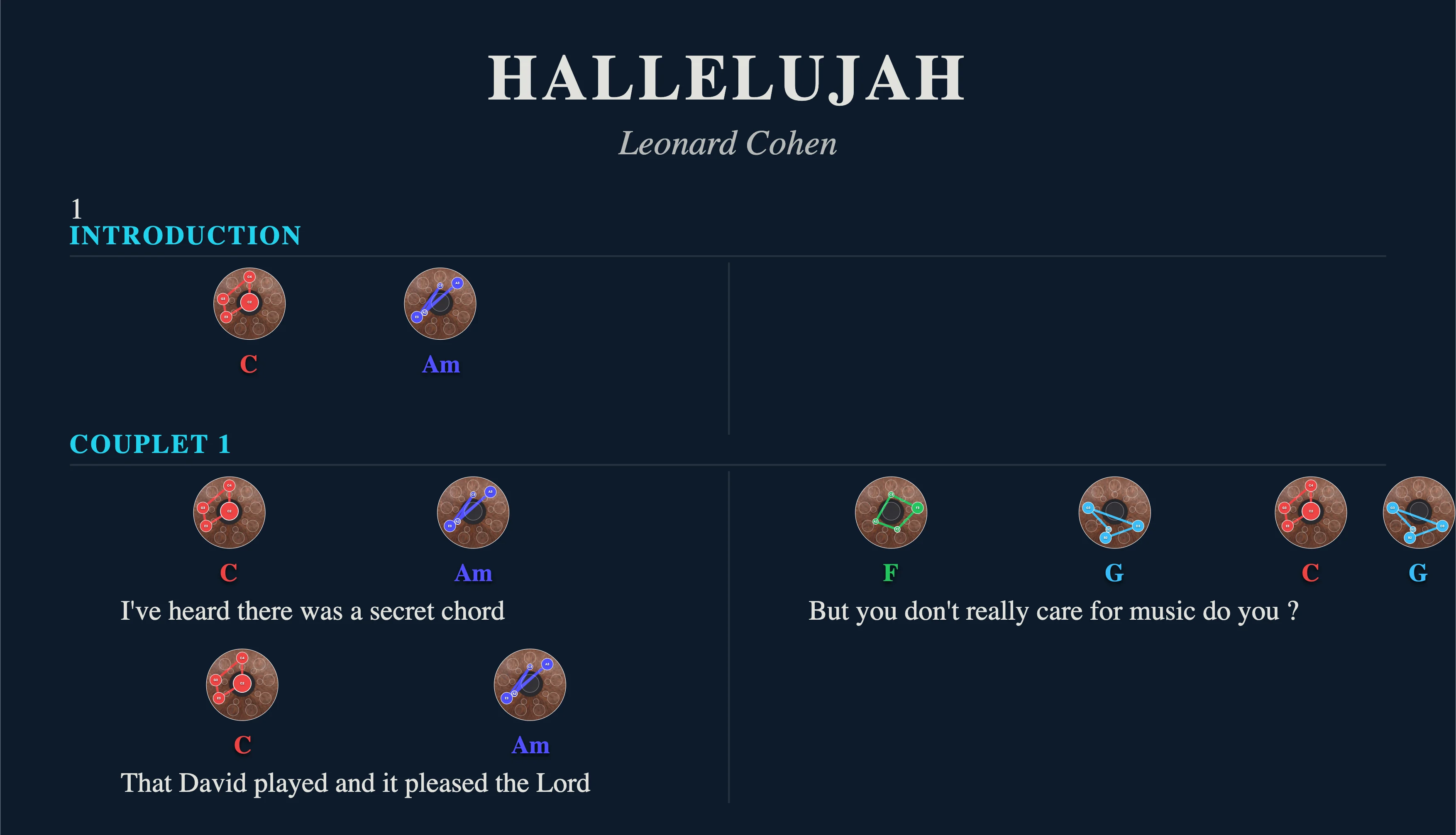
The Song Mode in Handpan Studio’s visual score editor shows lyrics with chord diagrams anchored above the words — like a guitar chord chart, but with colourful mini-handpans. You see where the chord changes, you sing, you play. No music theory required: the colours guide you.
Sing and play at the same time
Accompanying a song on the handpan means juggling two things: following the lyrics and knowing which chord to play at which moment. Without a visual cue, you lose the thread the instant the melody gets tricky. Song Mode solves this at a glance: above each syllable where the chord changes, a handpan diagram appears. You read the line left to right, exactly as you’d sing it, and each diagram tells you precisely which notes to touch.
Several songs come ready with lyrics and chords: Hallelujah, Let It Be, No Woman No Cry, Stand By Me. You pick the title, the editor places the diagrams, and the song becomes playable.
Example: Hallelujah
Open Hallelujah in Song Mode. Above the word where the first chord lands, a mini-handpan appears with its coloured notes. You play the chord, you sing the line, and when the next diagram arrives above another word, you change. The famous rise of “Hallelujah…” becomes a series of diagrams you chain in rhythm with the syllables. You don’t have to count bars: the words carry you, the colours tell you where to go.
Example: Let It Be
Same logic for Let It Be. The progression loops, and the diagrams return above the same words each chorus. In two or three passes, you memorise the path of the colours and sing while playing, without ever leaving the score. This is where the handpan as an accompaniment instrument truly shines.
How it works
It all starts from the app’s Export button, which opens the visual score editor.
Choose the song and display mode
Select a title from the library, then set the display to suit your need. The editor offers several modes: Chord Sequence, Instrument only, Full, and Song Mode (lyrics + diagrams). You also switch between Portrait and Landscape orientation depending on line length.
Ink-Saver for printing
Before printing, turn on Ink-Saver Mode: the background goes white, ink savings are clear, and the score stays readable on paper. Perfect for placing a sheet on your stand next to the instrument.
Export and keep
Once the display is set, you export as PDF or PNG — the diagrams can also go out as separate files in a ZIP. Every export discreetly carries the note “created with Handpan Studio by David Lesage”. For everything about formats and export logic, the article on keeping and sharing your chords gets straight to the point.
Your song, within reach
Creating and exporting in acoustic mode is free; the Studio version adds cloud saving to find your songs everywhere. Open Handpan Studio, load Hallelujah or Let It Be in Song Mode, and play your first song tonight.
Ready to make your colours sing?
Try the app for free, or discover the electronic Neotone handpan.