Scales & creation scalestutorial

How to create your own handpan scale (tutorial)

Understand what a handpan scale is and learn to build your own, for free, in Handpan Constellation Studio's acoustic mode — then share it with the community.
How to create your own handpan scale (tutorial)

Creating your own handpan scale means choosing the set of notes that will make up your instrument — their order, their number and the emotion they carry. In the Handpan Constellation Studio app you can do it for free, draw your layout in colour, hear it live, then save it and share it with the community. This tutorial shows you how.

The approach is the same whether your handpan is acoustic or electronic: you pick a tonic, you place notes around the ding, you listen. The screenshots in this article show the Création tab in acoustic mode, because that is where creating is free; the gesture itself is identical on the electronic side.

What is a handpan scale?

A scale is the “character” of your pan: a central note (the ding) surrounded by notes laid out around the dome. Each scale has an emotional colour — meditative, bright, mysterious — depending on the intervals you choose. Understanding this is already composing: you don’t place notes at random, you build a mood.

Tonic, degrees and intervals

  • The tonic gives the resting point, the “home” of the scale.
  • The degrees are the notes built around it; in colours (ChromaKeys), each keeps a stable hue.
  • The intervals — the gaps between notes — decide whether the scale sounds joyful, dark or contemplative.

Create your scale in Handpan Constellation Studio (acoustic mode, free)

  1. Open acoustic mode. The Discovery version of Handpan Constellation Studio is free and enough to build a scale.
  2. Choose your tonic. It sets the overall colour and acts as the central note.
  3. Add your notes. Place the degrees around the ding; the screen shows them in colour and draws chord Constellations in real time.
  4. Listen and adjust. Play your layout, move or replace the notes that don’t speak to you. Your ear decides, your eye confirms.
  5. Save your scale. Store it to find it later, on an acoustic handpan or a Neotone.
The Création tab on a D Minor / Kurd 10 acoustic handpan, dark theme. Along the top, the compact single-line tool strip: the ChromaKeys island (Off / On, set to On), « La couleur dit… la note · chakras », « Notes partagées » on On, then the four menus NOTATION ABC, APPARENCE Handpan Acoustique, MAINS & DOIGTÉ and CONSTELLATION Ouvert, and on the right the EXPORTER PDF / PARTITION island outlined in cyan with its printer icon. In the centre, the pan with its D3 ding and its coloured notes D4, A#3, A3, F4, E4, C4, C5, A4, G4; the handpan screen reads « D Minor / Kurd 10 ». Around the top of the pan, the full chromatic wheel — C, C#, D, D#, E, F, F#, G, G#, A, A#, B — each dot in its own colour, with the octave 2 to 5 arcs. On the left, a vertical column of six icons in a yellow frame: rainbow (active), keyboard, pencil, bin, undo, redo. On the right, the « Mes handpans » panel: « D Minor / Kurd 10 » marked « tu joues dessus », the « POUR D Minor / Kurd 10 » bar with the ACOUSTIQUE badge, « 🎼 Mes morceaux (156) », « 🎡 Tester une autre tonalité », « + Ajouter un handpan », « 📤 Partager cette gamme » and « ⚡ Ajouter un handpan électronique »; below, the collapsed « ✨ Ce que tu peux faire » and « 🎯 Compléter » sections, then « 🧭 Découvrir d'autres gammes ». Along the bottom, the seven chord slots Dm, E°, F, Gm, Am, A#, C.
The Création tab in acoustic mode (ACOUSTIQUE badge on the right), on a D Minor / Kurd 10. The chromatic wheel surrounds the pan: click a dimple, then the colour of the note you want on it. The right-hand panel stays focused on Mes handpans: the loaded instrument, its songs, and the doors to a second pan. (Screenshot of the French interface.)

Click the image to open it, then click again for full size.

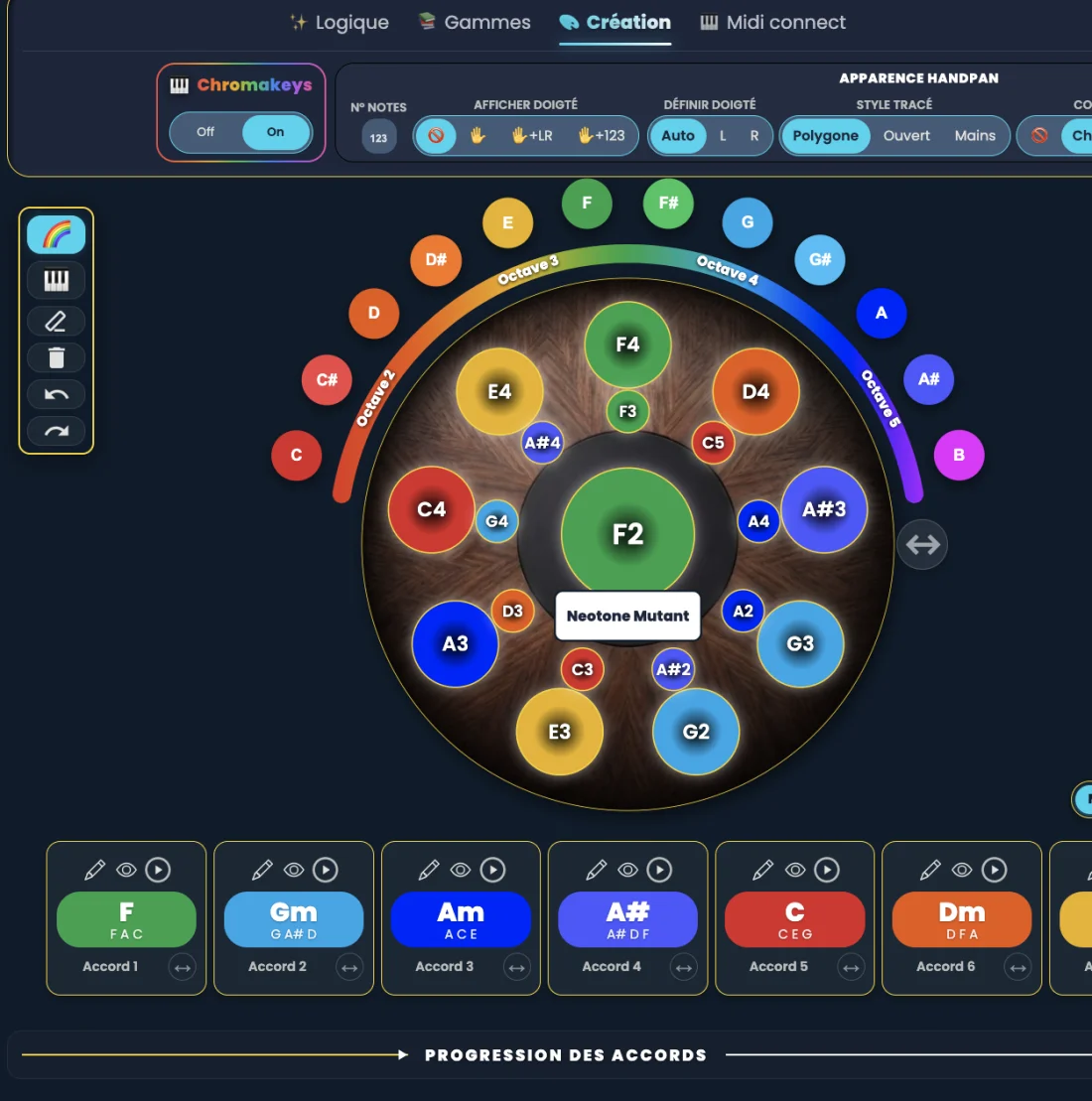
The Création tab on a Neotone Mutant electronic handpan, dark theme, ChromaKeys on. Along the top, the compact single-line tool strip: the ChromaKeys island (Off / On, set to On), « La couleur dit… la note · chakras », « Notes partagées » on On, a « La palette de création ChromaKeys » island also on On, then the four menus NOTATION ABC, APPARENCE Noyer, MAINS & DOIGTÉ and CONSTELLATION Ouvert, and on the right the EXPORTER PDF / PARTITION island outlined in cyan with its printer icon. Every note on the pan is painted in its own colour and ringed with a halo — D2 orange at the centre, C#4 and C#3 red, B3 magenta, A3 and A4 blue, F#3 and F#4 green, G3 and G4 sky blue, E2 and E3 yellow. Around the top of the pan, the chromatic wheel is unfolded: C, C#, D, D#, E, F, F#, G, G#, A, A#, B, each in its own colour, with the octave 2 to 5 arcs. On the left, a vertical column of six icons in a yellow frame — rainbow (active), keyboard, pencil, bin, undo, redo. Along the bottom, the seven chord slots: D, Em, F#m, G, A, Bm, C#°, each with its three notes written underneath. The handpan screen reads « Neotone Mutant ».
The same screen on an electronic handpan.

Click the image to open it, then click again for full size.

Lean on the colours

If you’re a beginner, the visual method makes composing far more intuitive: choose the emotion first, then the colour, then the note. To grasp the principle, read handpan by colours (ChromaKeys).

Share your scale with the community

Once your scale is created, you can name it and share it: other players load it, try it and get inspired. It’s also how you discover layouts imagined by others — a living atlas that grows with every creation.

Want to go further and be guided from the first note to your first composition? David Lesage’s lessons walk you through it step by step.

Creating your own scale isn’t reserved for experts: it’s the most direct way to make your emotion sound, on your very own instrument.

Ready to make your colours sing?

Try the app for free, or discover the electronic Neotone handpan.