Scores & composing playermusic standprinting

Your score comes alive: the player, the repeats, the music stand

The score no longer just gets printed: it plays, lights up chord after chord, counts your repeats and goes full screen.

Your score comes alive: the player, the repeats, the music stand

Until now, Handpan Constellation Studio’s visual score was there to keep and to pass on: you exported it as a PDF, printed it, sent it. It can now do one more thing, and it’s the one that changes daily practice: it plays itself. The current diagram lights up, the page scrolls on its own, and all you have to do is follow.

Everything below holds whether your handpan is acoustic or electronic: a score, a player, a music stand and a printout don’t depend on the instrument you play them on.

Reading a score already means doing two jobs

When you work through a chord chart, your brain does two jobs at once: playing, and knowing where you are. The second one eats almost all the energy. You lose your line, you repeat the wrong verse, you stop to check — and the musical momentum drops.

A player that points at the exact spot solves that quietly.

▶ The player: a score you can listen to

A ▶ / ⏸ / ⏹ bar plays the chords in the order of the lyrics. The current diagram lights up, the page scrolls by itself: impossible to get lost. You choose block chords or arpeggios, you set the BPM live, and the arpeggios really do unfold at the tempo — in eighths or quarters, depending on what you’re working on.
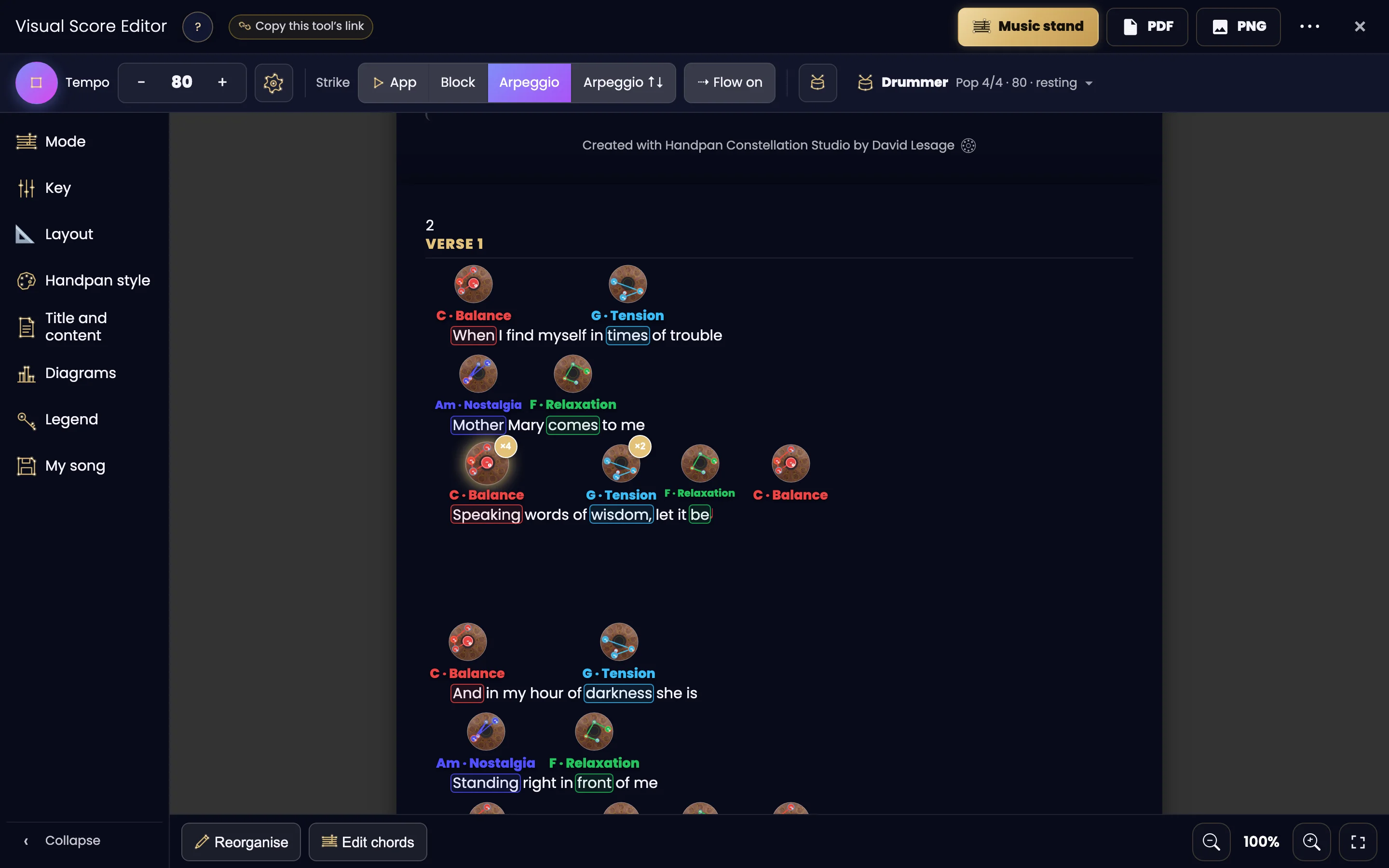
Handpan Constellation Studio, Visual Score Editor in Song mode, Starry Night theme, while Let It Be plays in C major. At the top, “Copy this tool’s link”, then the Music stand, PDF and PNG buttons. Below, the playback bar: the round button shows ■ (the piece is playing), Tempo 80, Strike set to Arpeggio among App, Block, Arpeggio and Arpeggio ↑↓, Flow on, and “Drummer Pop 4/4 · 80 · resting”. On the left, the sections Mode, Key, Layout, Handpan style, Title and content, Diagrams, Legend and My song. In the centre, section 2, VERSE 1: above the lyrics “When I find myself in times of trouble / Mother Mary comes to me / Speaking words of wisdom, let it be”, the diagrams C · Balance in red, G · Tension in sky blue, Am · Nostalgia in indigo and F · Relaxation in green; the word each chord falls on is framed in its colour. On the third line, the C carries a ×4 badge and the G a ×2 badge. The C is the chord playing right now: its diagram is lit up and “Speaking” is highlighted. At the end of the line, F · Relaxation then C · Balance, side by side on the last word. Further down, the rest of the verse: “And in my hour of darkness she is / Standing right in front of me”. At the bottom, Reorganise, Edit chords and the 100% zoom.
The editor while Let It Be plays, in C major: the play button shows ■ (the piece is playing), the strike is set to Arpeggio and the tempo to 80. Above the verse lyrics, the original chords, C, G, Am, F, each with its emotion. On the third line, the C carries the ×4 badge and the G the ×2 badge; the C is the one playing: its diagram lights up and “Speaking” is highlighted.

Click the image to open it, then click again for full size.
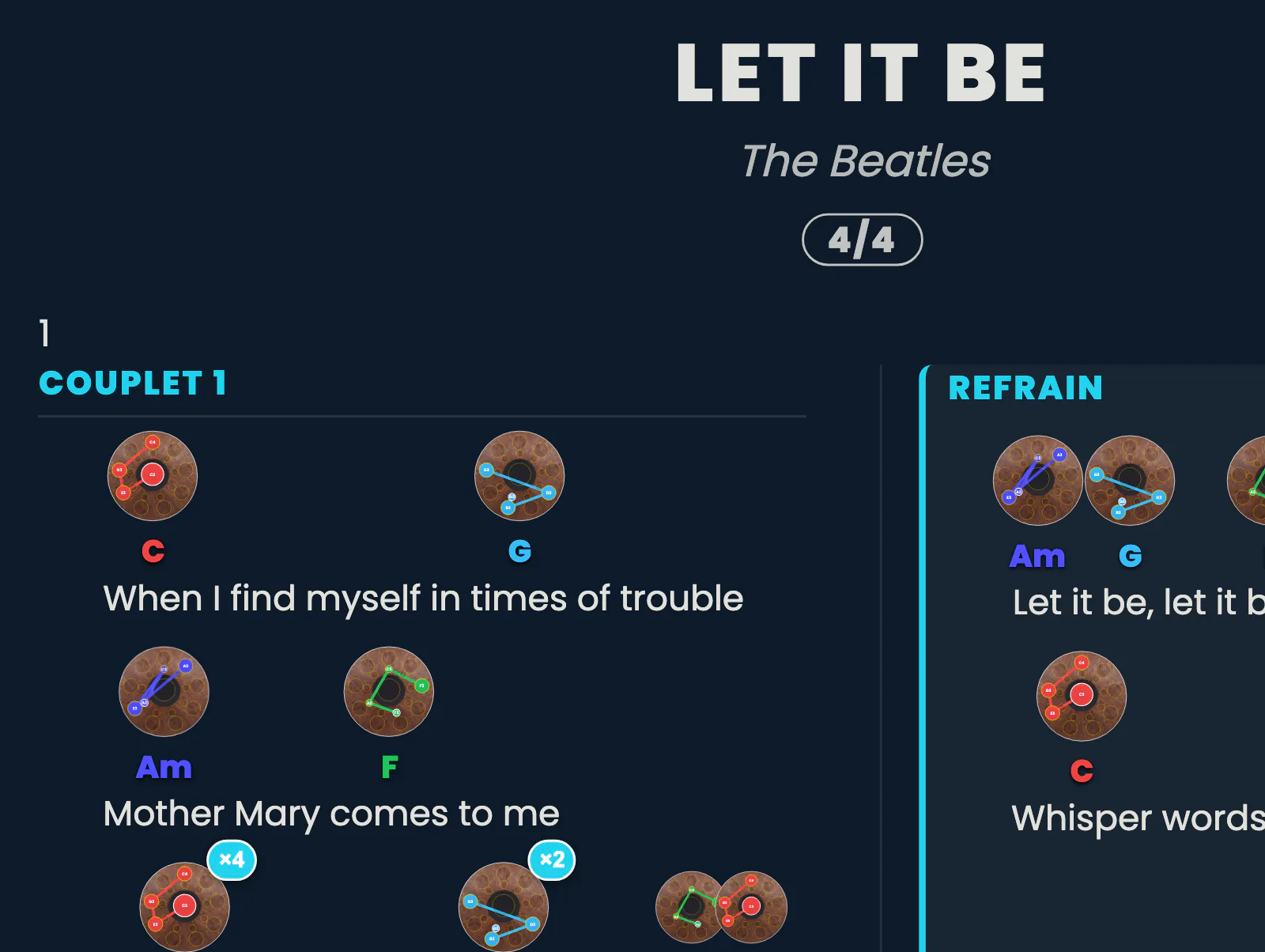
Close-up of the score sheet during playback: the Am chord diagram is enlarged and surrounded by a cyan halo, while the neighbouring diagrams stay at normal size with no halo.
The same screen, closer in: the diagram currently playing — here Am — grows and lights up with a cyan halo. The others stay dark.

Click the image to open it, then click again for full size.

It’s also a way to learn a piece by ear: you listen to it turn at 40 BPM, very slowly, until the progression becomes obvious.

×N: saying how many times

Every chord carries a small ×N badge. One click and you say how many times to play it, from 1 to 8. The player takes it into account, and the ×N values appear on the PDF — because a chart without repeats is only half a score.
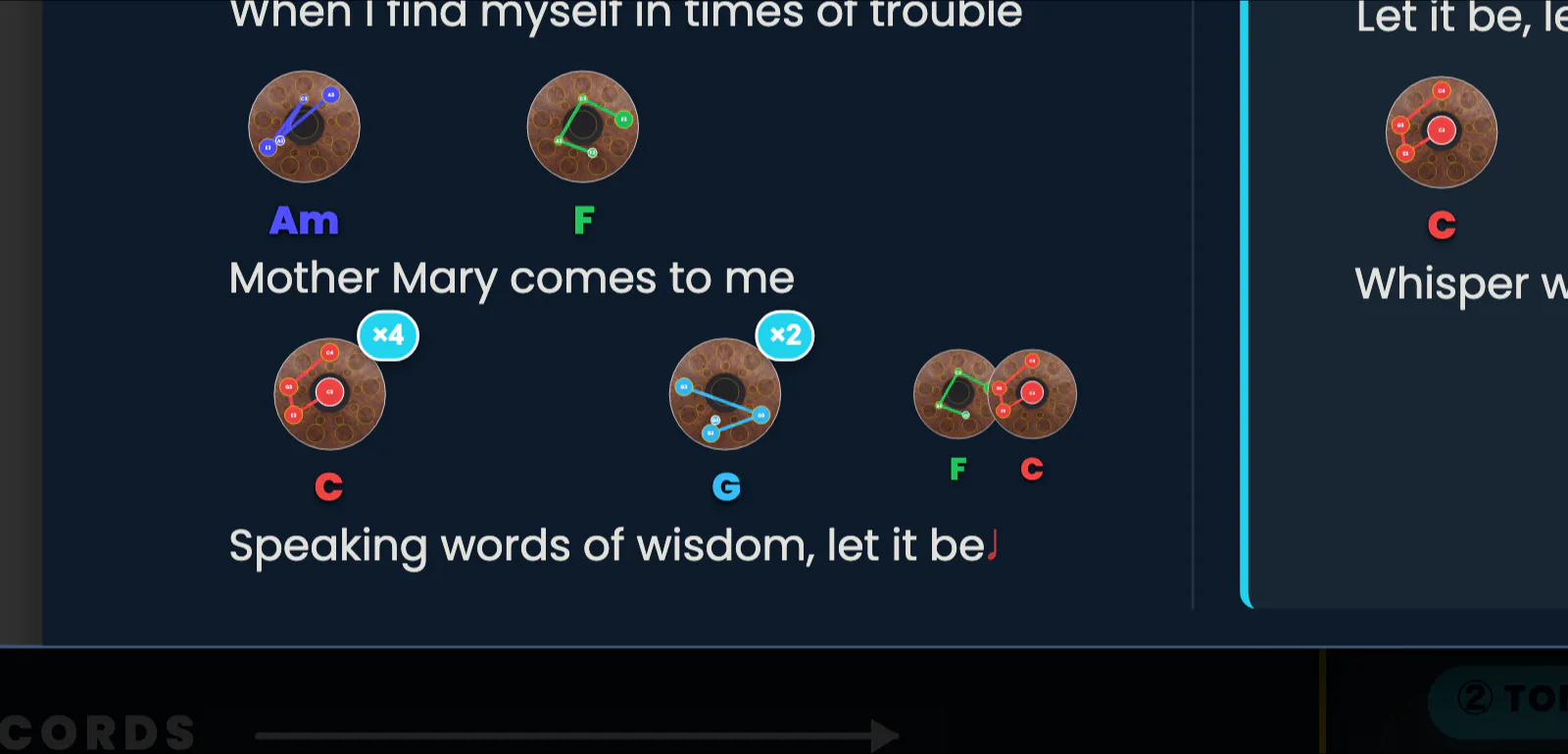
Detail of a lyric line from Let It Be: above the words « Speaking words of wisdom, let it be », three chord diagrams — C, G, then F and C side by side. The C diagram carries a cyan « ×4 » badge, the G one a « ×2 » badge.
The ×N badge sits on the diagram itself: ×4 on the C, ×2 on the G. Each click moves the count up one step.

Click the image to open it, then click again for full size.

In the same spirit, a song now carries its time signature — 4/4, 3/4, 6/8 or 2/4 — displayed near the title, on the preview as well as in the exports.

🎼 The music stand (Pupitre): full screen, screen awake

Here’s the little detail that helps every single day. One 🎼 button and your score goes full screen, ready to play from an iPad or a phone propped in front of you: scroll with a finger, zoom by double-tap or pinch, and above all the screen stays awake while you play. No more screen going dark mid-chorus, no file to generate, no waiting.

The top of a score, Starry Night theme: the title LET IT BE in capitals, the author The Beatles in italics, and below it a rounded “4/4” pill.
The time signature appears just under the title and author, in a pill — here 4/4. It follows the piece all the way into the exports.

Click the image to open it, then click again for full size.
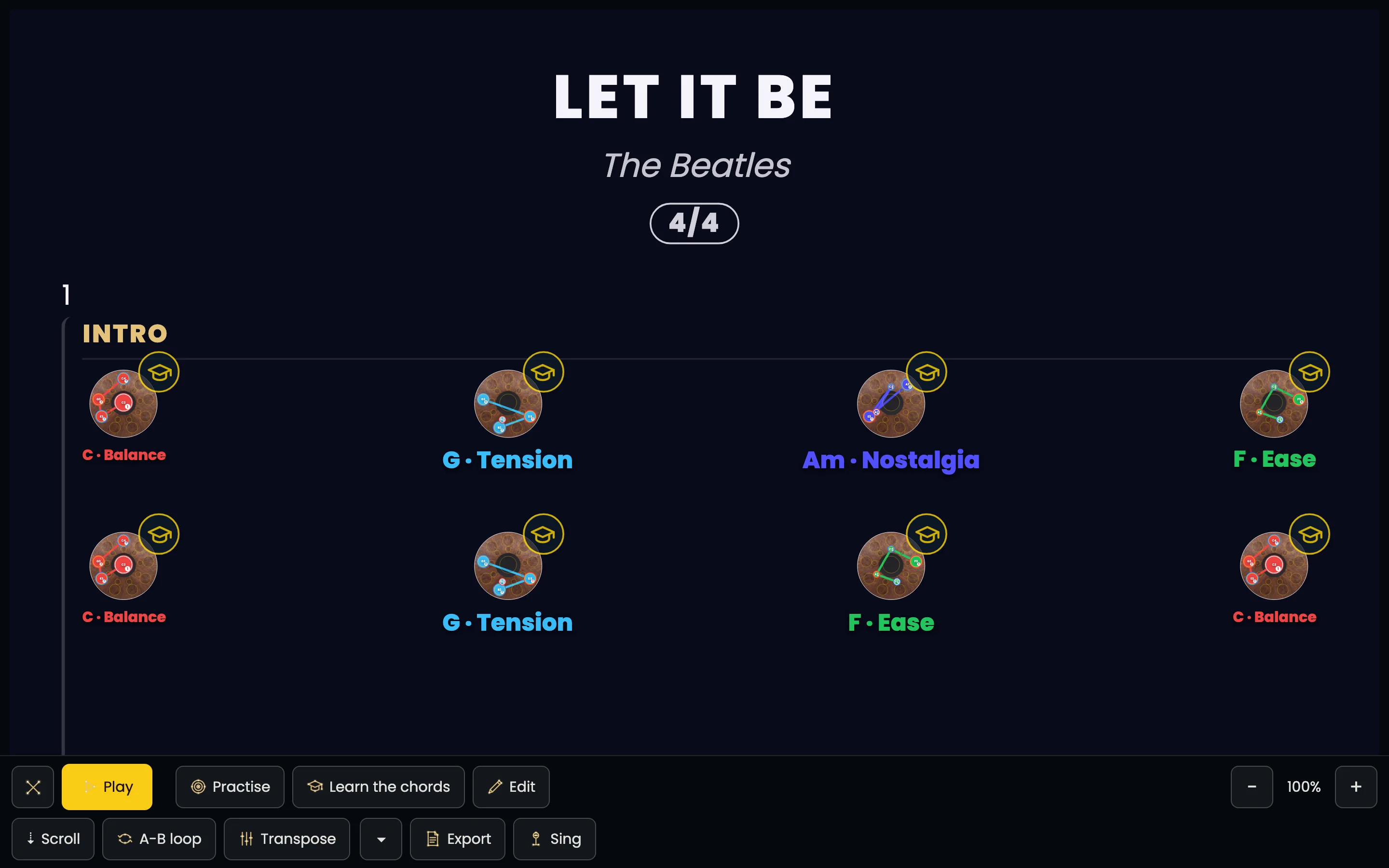
The music stand on a computer screen, Starry Night theme: the title LET IT BE, The Beatles, the 4/4 pill, then section 1, INTRO, with eight diagrams on two rows: C · Balance, G · Tension, Am · Nostalgia, F · Ease, then C · Balance, G · Tension, F · Ease, C · Balance. Each diagram carries a small golden cap. At the bottom, two rows of controls: close, Play (in yellow), Practise, Learn the chords, Edit and the − 100% + zoom; then Scroll, A-B loop, Transpose, a ▾ menu, Export and Sing.
The 🎼 music stand on a computer, open on Let It Be: the intro in C major, C, G, Am, F, then C, G, F, C.

Click the image to open it, then click again for full size.
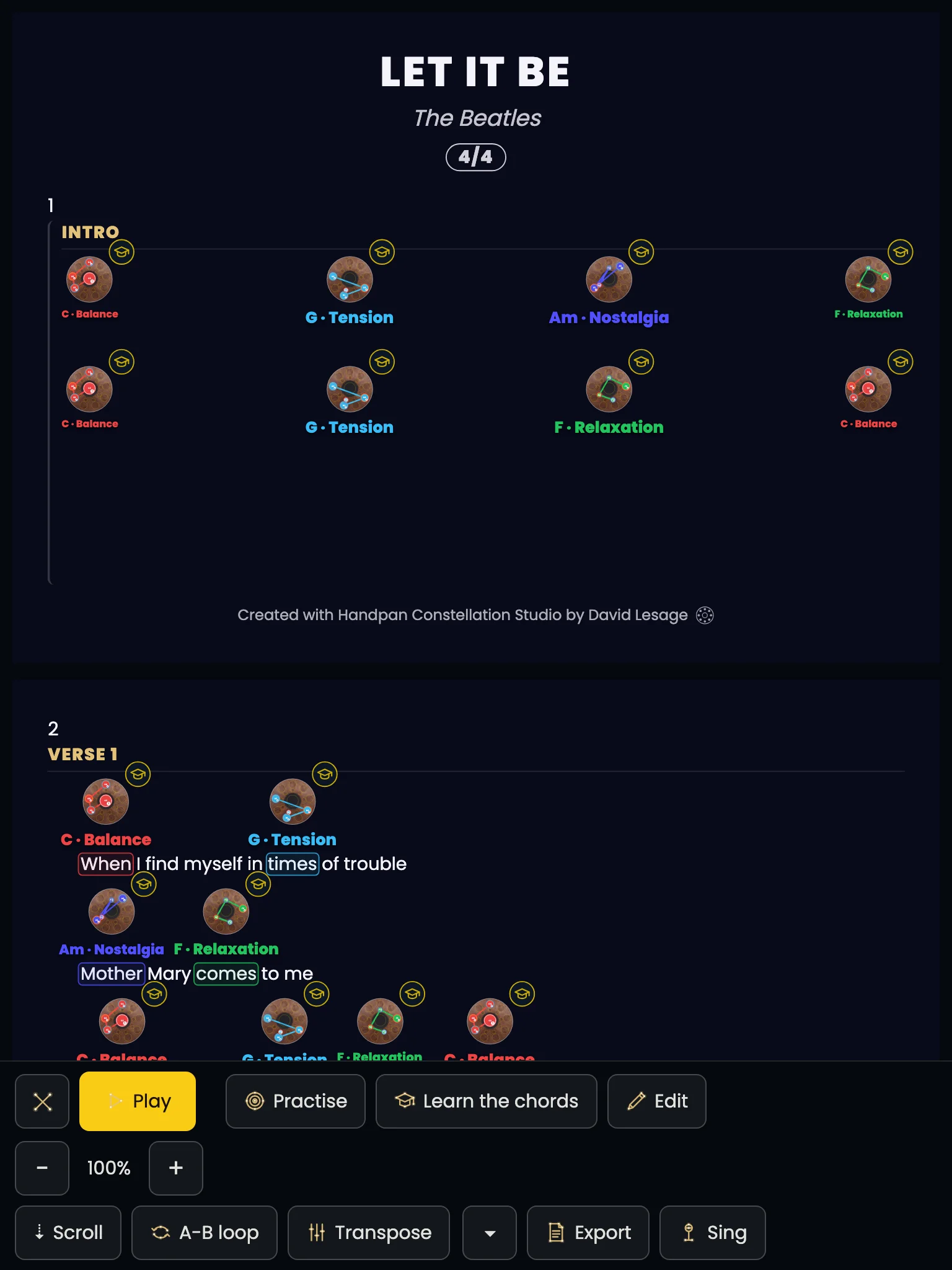
The music stand at tablet-portrait size, Starry Night theme. The Let It Be score fills the screen: title, The Beatles, 4/4, then the Intro with eight diagrams on two rows (C · Balance, G · Tension, Am · Nostalgia, F · Relaxation, then C · Balance, G · Tension, F · Relaxation, C · Balance), each with a small golden 🎓 on its corner. Then VERSE 1: the diagrams above the lyrics “When I find myself in times of trouble / Mother Mary comes to me”, the word each chord falls on framed in its colour (When, times, Mother, comes). The next line is cut off by the music stand bar at the bottom: close, Play (in yellow), Practise, Learn the chords, Edit, the 100% zoom, then Scroll, A-B loop, Transpose, a ▾ menu, Export and Sing.
The 🎼 music stand at iPad-portrait proportions: the score fills the screen, and the playing controls are grouped at the bottom — Play, Practise, Learn the chords, Edit, the zoom, then Scroll, A-B loop, Transpose, Export, Sing. In the verse, each coloured frame surrounds the word the chord falls on, and the small 🎓 sits on the corner of each diagram.

Click the image to open it, then click again for full size.

The music stand opens from the editor, from your pieces, from the ▶ Play tab, and on the way out of Quick Jam.

🖨 And for those who love paper

A piece you composed now prints the way it’s played: one line per part, with its colour band (Verse, Chorus, Bridge…), the diagrams in order, and all your settings respected — Eco-Ink mode, landscape, legend. An optional memo page lists the chords section by section, with their repeats.

First page of a PDF actually exported by the application, in Eco-Ink mode (white background). Title PETITE RONDE DU SOIR, subtitle « par David Lesage — Gamme : Do majeur (démo) (C) ». In the middle, the handpan diagram with its notes named C2 to G4. Below it, the line « Accordage : C Majeur — C2 · D2 · E2 · F2 · G2 · A2 · B2 · C3 · D3 · E3 · F3 · G3 · A3 · B3 · C4 · D4 · E4 · F4 · G4 ». Then two sections: a blue « Couplet » band followed by the C, G, Am, F diagrams, and a pink « Refrain » band followed by the F, C, G, C diagrams. Footer: « créé avec Handpan Constellation Studio by David Lesage ».
A piece composed in the app, exported to PDF and printed in Eco-Ink: one line per part, each section announced by its colour band — Couplet in blue, Refrain in pink — and the diagrams in playing order.

Click the image to open it, then click again for full size.

You can also choose the diagram size — S, M, L or XL — for a score that reads from a distance, and reorder lyric lines by drag and drop.

A score written by several hands

One last point, and it matters: shared scores keep track of who contributed what, first and last name shown. Placing a chord in the right spot, fixing a repeat, specifying a time signature: small gestures, but end to end they build a handpan repertoire that existed nowhere else. It’s the same spirit as the feedback feature — a tool we make together.

Exports made on a free account carry a discreet “free version” watermark; everything else — player, music stand, repeats — stays under your fingers.
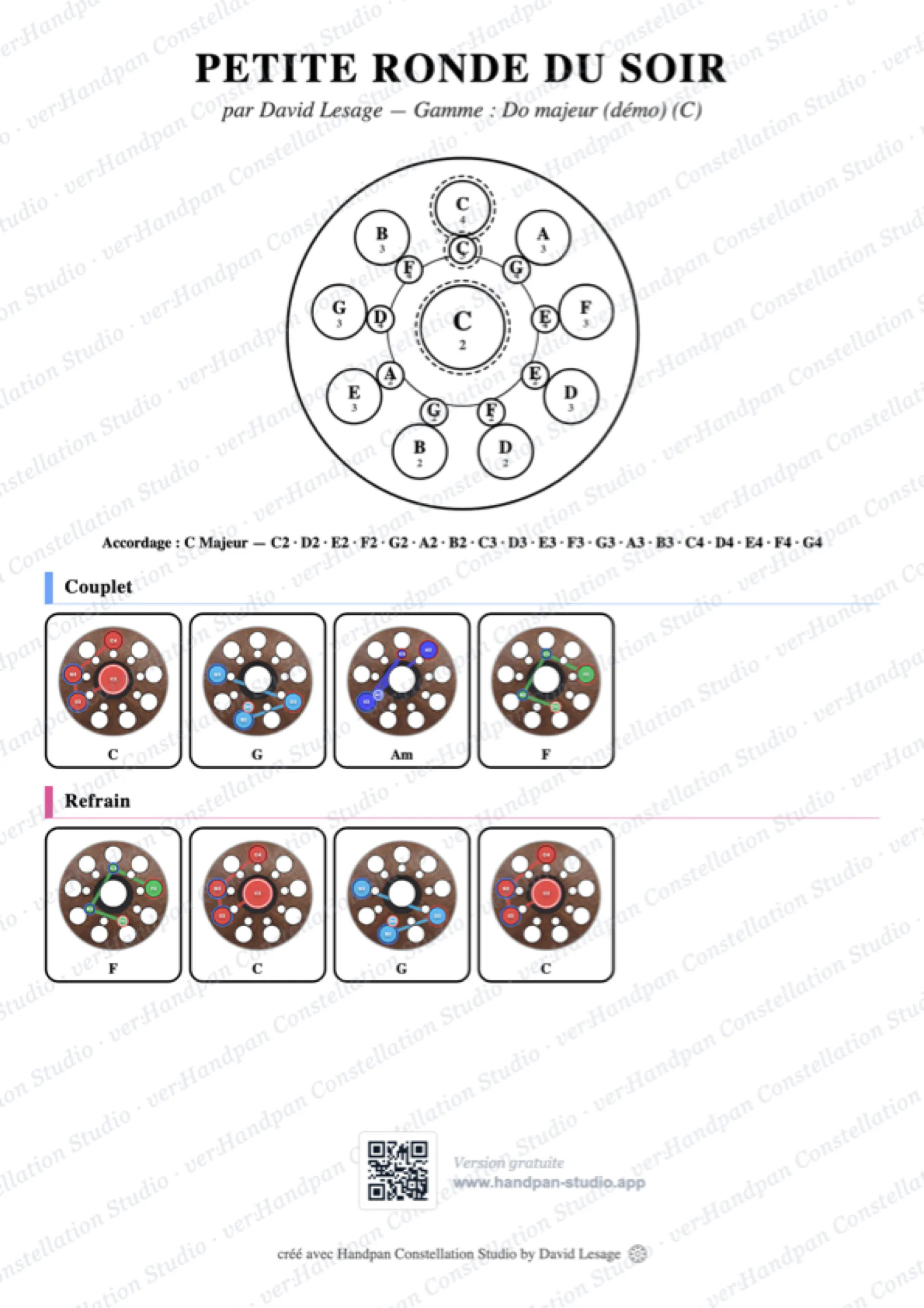
The same PDF export, this time without Studio access: the watermark « Handpan Constellation Studio · version gratuite » is repeated diagonally across the whole page, over the title, the handpan diagram and the chord diagrams. At the bottom, a QR badge accompanies the mention « Version gratuite · www.handpan-studio.app », overlapping the footer.
The same export, made on a free account: the « version gratuite » watermark is repeated across the page, and a QR badge is added in the footer.

Click the image to open it, then click again for full size.

Open Handpan Constellation Studio, load a song and press ▶. Watch it light up chord after chord: that’s the moment a score stops being a document. And if you’d like us to work through a piece together, my handpan lessons are made for that.

Ready to make your colours sing?

Try the app for free, or discover the electronic Neotone handpan.