“Reveal”: everything your handpan already knows how to play
A D Kurd 10 gives you 6 chords and lets you accompany over 150 pieces from the repertoire. One button shows you that, before you even think about a second instrument.
The fairest criticism I’ve had about the app is that it offers a great many possibilities without clearly saying how you get to them. This article is about a screen that answers exactly that, and which didn’t exist a week ago: ✨ Reveal.
One door, one button, and one question put to your instrument: what do you already know how to do?
This article describes the screen as you open it in acoustic mode, on a handpan with fixed notes: that’s where the question “what does my instrument already know how to do?” really arises, since the answer can’t be changed with a setting.
Where it is, exactly
Load your scale in acoustic mode. Under the pan you have the 🎼 Chord workshop bar — the one that says “all the chords you can play on your D Kurd 10”. To the right of that bar: ✨ Reveal, ↗ Enlarge, 🖨 Print. Unfolded, the bar opens the workshop in a panel on the right, without hiding the pan. And ✨ Reveal also sits in the ▶ Play tab, among what your pan allows.
One click on ✨ Reveal, and the screen opens full frame.
Until 31 August, this screen was shut away in the 🧪 Lab and reserved for the duo. Two things have changed: it’s out of the Lab, and it works with a single handpan. That matters, because the person who most needs to know what their instrument allows is precisely the one who only has one.
The case I’m starting from: a D Kurd 10
I’m deliberately taking the most widespread instrument, not mine. A D Kurd 10 notes — the best-selling scale in the world: D₃ · A₃ · B♭₃ · C₄ · D₄ · E₄ · F₄ · G₄ · A₄ · C₅.
It’s also the instrument people go round in circles on. You play three motifs, you find them beautiful, and a few months later you no longer know what to do with it — without ever having known, in fact, what was inside it.
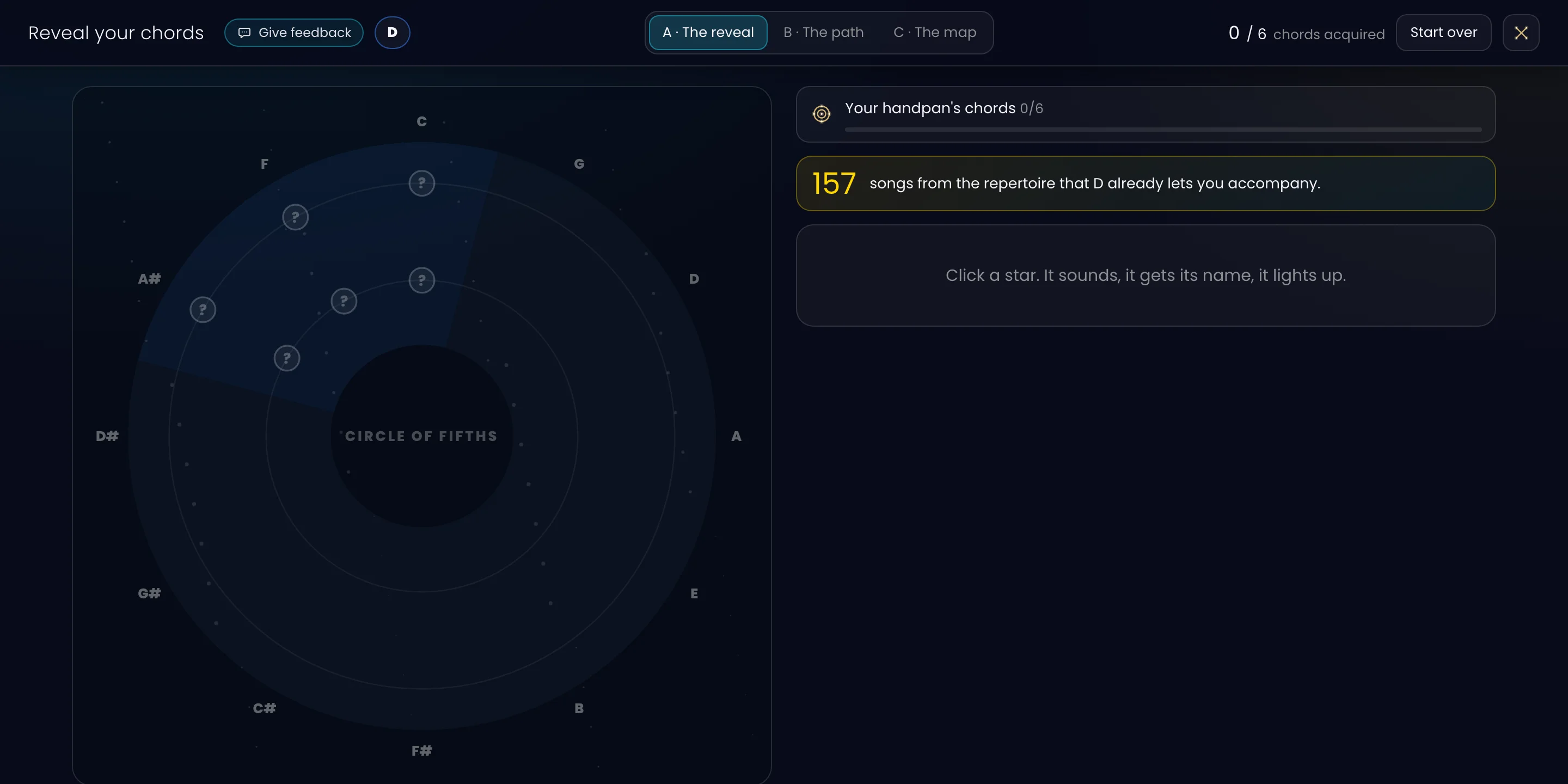
Here’s what the screen answers, on this instrument:
0 / 6 chords acquired 157 songs from the repertoire that D already lets you accompany.
Six, and one hundred and fifty-seven. Those are the two numbers that count, and they aren’t of the same order.
Click the image to open it, then click it again for full size.
Six chords, and which ones
A handpan doesn’t “contain” chords: it contains notes, and some chords fall inside them, others don’t. On a D Kurd 10 there are seven different notes out of the twelve in music — C, D, E, F, G, A, B♭ — the rest are the same ones an octave apart.
Out of those seven notes come exactly six major or minor chords:
| Chord | Notes | Remark |
|---|---|---|
| C major | C · E · G | |
| D minor | D · F · A | the chord that gives the scale its name |
| F major | F · A · C | |
| G minor | G · B♭ · D | the only one without its bass |
| A minor | A · C · E | |
| B♭ major | B♭ · D · F |
The right-hand column deserves a word. A chord “has its bass” when its root can sit lower than its two other notes: it’s the root you hear underneath, and that’s what makes a chord settle instead of float. On a D Kurd 10, five chords out of six have their bass. G minor doesn’t: the lowest G on the instrument sits above the D. It sounds, but inverted.
That isn’t a theoretical detail — it’s exactly what you hear when an accompaniment “doesn’t hold” and you can’t tell why.
The circle that isn’t closed
The screen doesn’t just make a list. It lays your chords onto the circle of fifths — the wheel that arranges the twelve keys by kinship — and lights them up.
The result, on a D Kurd 10, is a very eloquent picture: six dots packed onto a single arc, and all the rest of the circle dark. Your instrument isn’t “incomplete”: it occupies a territory, and that territory has a shape.
That’s the sentence that made me keep this screen as it is: it’s a whole frame, not a slice of something bigger. A D Kurd 10 does one thing very well. It doesn’t do the others. Seeing the border beats guessing at it.
And the key wheel is right there beside it: once you’ve understood that the territory is an arc, you also understand why transposing changes everything.
One hundred and fifty-six pieces — and the truth behind the number
The second number is the more surprising one, and it’s the one to read honestly.
When I did the count, in September, the app’s repertoire held 197 pieces, and a D Kurd 10 on its own gave you 156 of them (157 today, as the screen above shows). Not 12, not 30: over a hundred and fifty.
But here’s what the figure doesn’t say on its own, and what I’d rather write down in black and white: of those 156, 148 are only playable by transposing. Only 8 land as they are, in their original key.
In practice, the app moves the piece into a key your instrument has:
- 105 pieces land in F major;
- 38 in D minor;
- the rest are spread across G, C and B♭.
Let It Be is a good example: the song is in C, your pan plays it in F. It’s playable, genuinely — but not in the key of the record. If you’re singing over it, that’s often good news even: it moves the melody to a pitch that may suit you better. If you’re playing with a guitarist who is in C, that’s a conversation to have.
That leaves 41 pieces out of reach: Bella Ciao, Hava Nagila, Amsterdam, Hotel California, Autumn Leaves, Get Lucky… And the screen also says why, in one line: the note that would unlock the most is C♯ — 28 pieces at once. Far behind it, B opens 5, F♯ opens 2.
That’s the kind of information that changes a decision. If one day you have a second instrument made, or buy one, you’re no longer starting from a hunch: you’re starting from a C♯ worth 28 songs. That’s the subject of the article on completing your acoustic handpan.
Your key: seven degrees on one side, zero on the other
The last thing this screen lays flat, and it explains a lot of frustration.
Your D Kurd is in D. In D natural minor you have 7 degrees out of 7: all seven chords of the key are there, you can build any progression at all without ever leaving your instrument. That’s huge, and it’s why the scale is so well designed.
In D major, you have 0 degrees out of 7. Not “few”: none. The D major chord itself doesn’t exist on your pan, because it’s missing the F♯.
When you try to play a happy song in D and it sounds sad whatever you do, it isn’t your ear: it’s your instrument, which only has one mode. Knowing that means you stop thinking you’re bad.
Three ways of looking at the same thing
The screen offers three models, switchable from a tab, and the progress is shared by all three: a chord “acquired” in one is acquired in the others.
- A · The revelation — a sky of dark stars that light up as you play. This is the default tab.
- B · The path — the tonal frames, step by step, degree by degree.
- C · The map — the circle of fifths, permanently displayed, filterable.
Each chord is practised right there: 👁 see it light up on your pan, ▶ hear it, 🔁 repeat it as a block chord or an arpeggio at a tempo — then “I’ve got it”, and that survives a reload.
None of the three is settled. They’re here together because I haven’t yet decided which one to keep, and I may well keep the choice. If you prefer one of them, tell me: that’s exactly what will decide it.
What it doesn’t do
Three limits, plainly.
The repertoire isn’t the world. 197 pieces is a catalogue under construction, not the whole of music. A piece missing from the catalogue isn’t an unplayable piece — it simply hasn’t been transcribed yet. The “156 out of 197” figure only holds within that frame, and I say so every time.
Acoustic fingerings are generated, not validated one by one. The play order and hand assignments you see on the pan come from a geometric engine that knows the real position of every note. It’s good. It hasn’t been reviewed scale by scale under my own hands, unlike those of the electronic Logic Mode. Take it as a solid proposal, not as a reference.
Reveal is young. It came out of the Lab on 31 August. It works, it’s accurate, but it will move — and it will move all the faster the more of you tell me what’s missing, using the 💬 “Give my feedback” button that now sits inside the screen.
Where to start, if you’re lost
If you open the app and the sheer abundance freezes you — it’s happened to people I know well — just do this:
- Load your scale.
- Under the pan, click ✨ Reveal.
- Click a star. It rings, it names itself, it lights up.
Six clicks later, you know everything your instrument can do. It’s the opposite of a feature catalogue: it’s a map of your instrument, and there’s nothing to buy in order to see it.
My goal hasn’t changed: to accompany myself on the handpan like a guitarist or a pianist. That starts with knowing what you have under your hands.
Open Handpan Constellation Studio, and if you’d like us to look at your scale together, my lessons are open.
Ready to make your colours sing?
Try the app for free, or discover the electronic Neotone handpan.