The handpan players map: everyone has a star on it
The app's handpan players map: everyone is a star on it, with a first name, an initial and a country. Find a teacher, a player or a maker near you, at a glance.
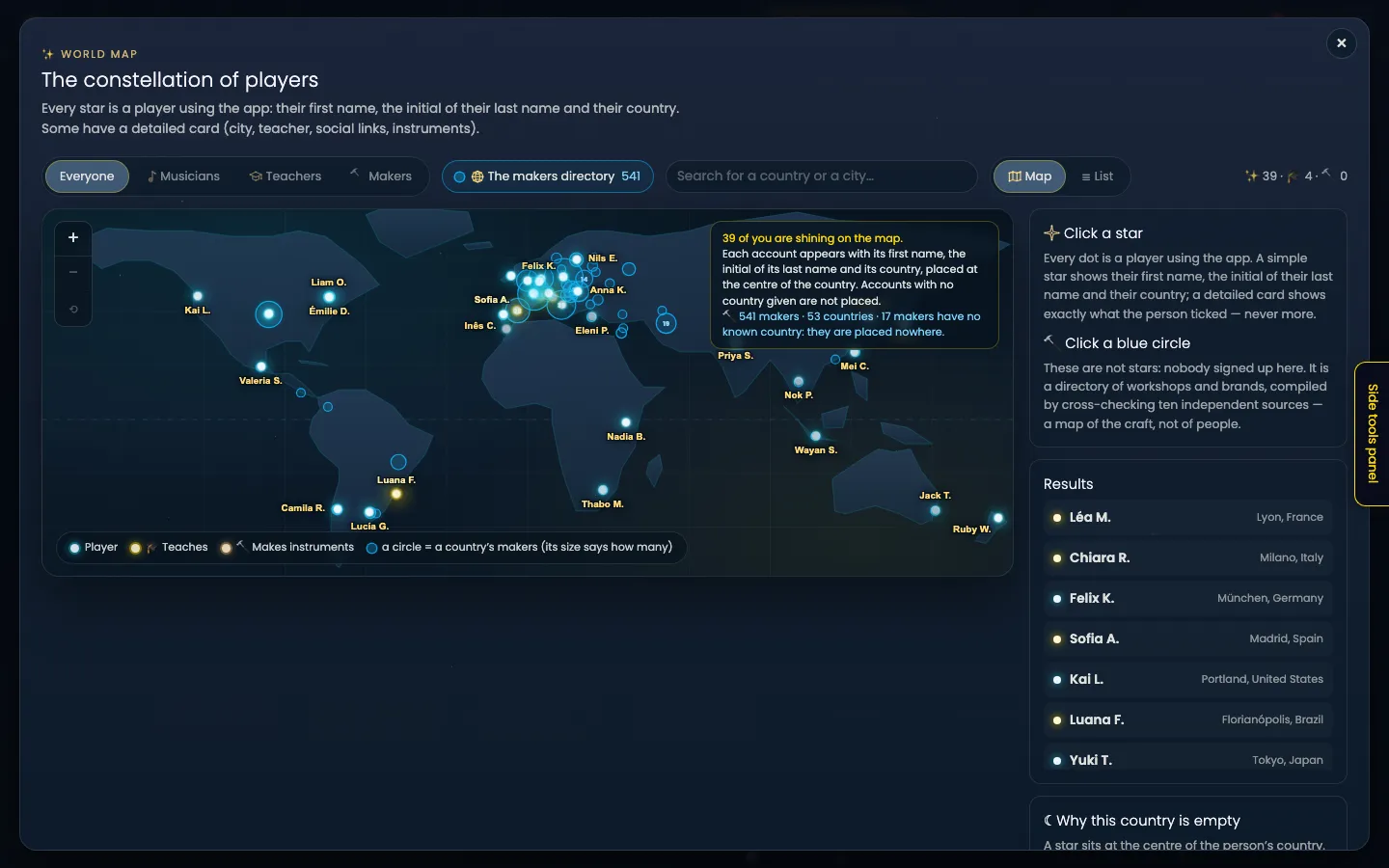
Article rewritten on 23 October 2026. Since 22 October, every player using the app has a star on the map, as soon as they accept the new terms of use. This article describes the map as it is today.
The handpan is a small world, scattered very thin. People playing three streets apart have no idea. Someone goes looking for a teacher with no way of knowing there’s one in their own town. There simply was no place where we could see each other.
The app has one: the constellation of players, a world map where every player is a star. At the top of the “My public profile” screen, the app says what it is for:
“So that everyone using the app can see who else uses it. Find a teacher near you. Come across someone who plays three streets away and never knew.”
The map draws no line between players: acoustic or electronic, it’s the same sky, the same star, the same settings.
Your star: a first name, an initial, a country
By accepting the terms of use, you appear on the map. Here is exactly what appears:
Your first name, the initial of your last name, your country. “Marie L. · France”. Never your address, your city or your email. And only signed-in accounts can see the map.
The star sits at the centre of your country. You pick that country from a list when you first arrive. If it’s missing, “My public profile” asks you for it once. Without a country, your star isn’t placed.
The simple star has one single option: “Show my full last name”. It starts unticked, and only the initial is shown.
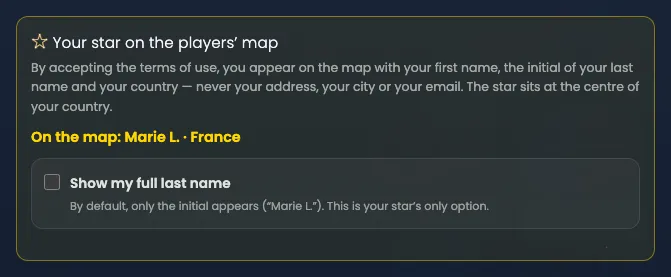
Click the image to open it, then click again for full size.
Why so little? Because a first name, an initial and a country are enough to know there are many of us, and say nothing about where you live.
Your detailed card: optional, and field by field
Everything else is your detailed card: a chosen name (“First name, initial, nickname… as you like”), a city or a region, your teacher or maker hat, your links (Spotify, YouTube, Instagram, your website), your instruments. It is off until you turn it on. Once on, it replaces your simple star.
And once it’s on, it isn’t a bundle. It’s field by field. You can wear the teacher hat without giving your city. You can add your links without saying what you build. The app puts it its own way: “What is empty does not show up — no orphan field on your card.”
That principle holds at every level. Your instruments show it best. Turning on your card doesn’t publish the list of your handpans: “Share my instruments publicly” is a separate box, unticked to start with. Ticked, it shows only the scale, the family (acoustic or electronic) and the model. Never your settings, your pieces or your recordings.
If you teach, the ”🎓 I teach” box gives your star a golden halo and lists you under “Teachers”. Six optional questions help a student decide: online or in person, languages, price, lesson length, complete beginners, how far you travel. This part arrived in late September. ”🔨 I make instruments” gives a copper halo and lists you under “Makers”.
What you see is what others will see
Next to the form, a box is titled ”👁 Here is exactly what others will see”. It isn’t a hand-written summary: it is the map’s card component, pixel for pixel, updating with every box you tick. There is no code that could make the two drift apart.
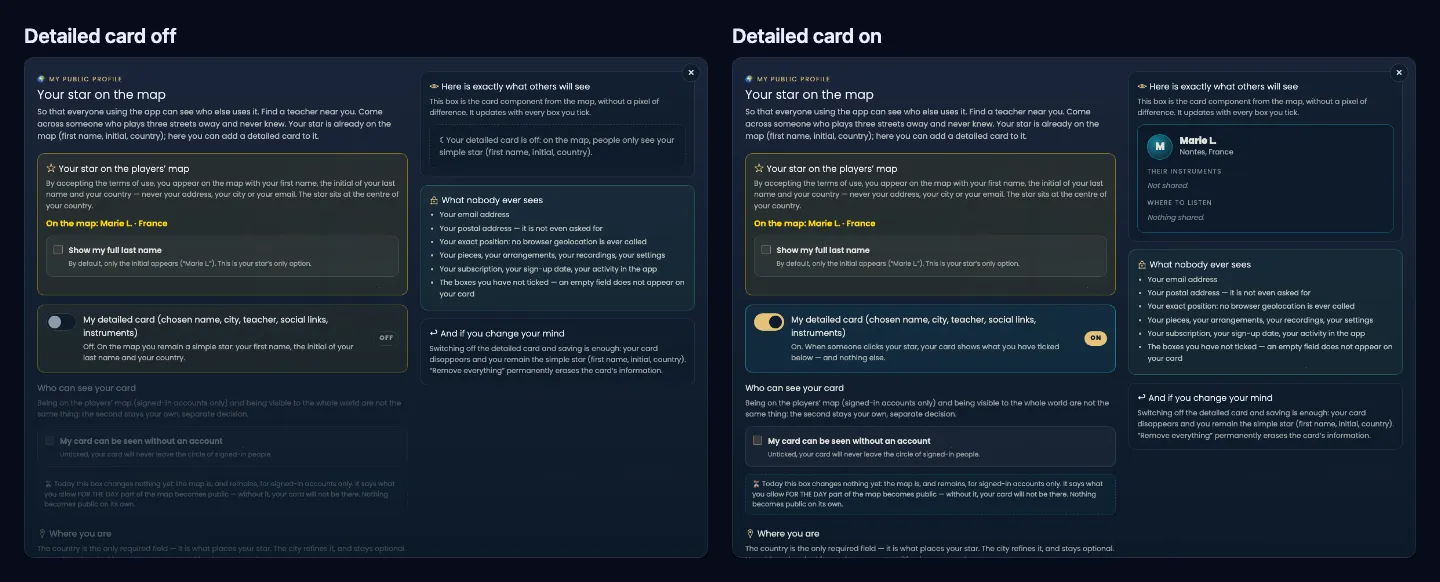
Click the image to open it, then click again for full size.
And if you change your mind
Switching off your detailed card and saving is enough: it disappears from the map, and you’re a simple star again (first name, initial, country). The ”🗑 Remove everything” button permanently erases the card’s information; your account, your pieces and your handpans are untouched.
Your simple star, though, can’t be switched off with a box, and that’s deliberate: “a user is a star”. Every user of the app is on the map, with the minimum: the first name, the initial of the last name and the country from their account. Everything else (your full last name, your city, your lessons, your social links, your website, your instruments) is yours to make public, or not. The terms of use (§ 6 bis) set out this principle, and explain the cases in which a star can be removed.
The app doesn’t know where you are
No geolocation. No address. The app never asks the browser where you are, and never asks you for an address: it has no field for one.
So how does a star find its place? Your simple star sits at the centre of your country. If you turn on your card and type a city, its place is worked out from that city’s name, looked up in a list of cities bundled with the app. What the app knows about your position is a word you chose.
There is no box for a latitude, no box for a longitude: they were never created. A star’s coordinates are worked out at display time. Never more precise than your city, then, and you can stay broader: a region is enough, and the app suggests it itself.
Even someone who wanted to be more precise couldn’t be: there is nowhere to put the information.
The 🎵 Musicians tab: how many, never who
The map has four tabs: Everyone · 🎵 Musicians · Teachers · Makers.
Under “Musicians”, one purple circle per country says how many musicians use the app. It’s an anonymous count: no name, no city, no position. Each account counts as one in its country, and a country with fewer than 3 people is never named. The stars light up on top.
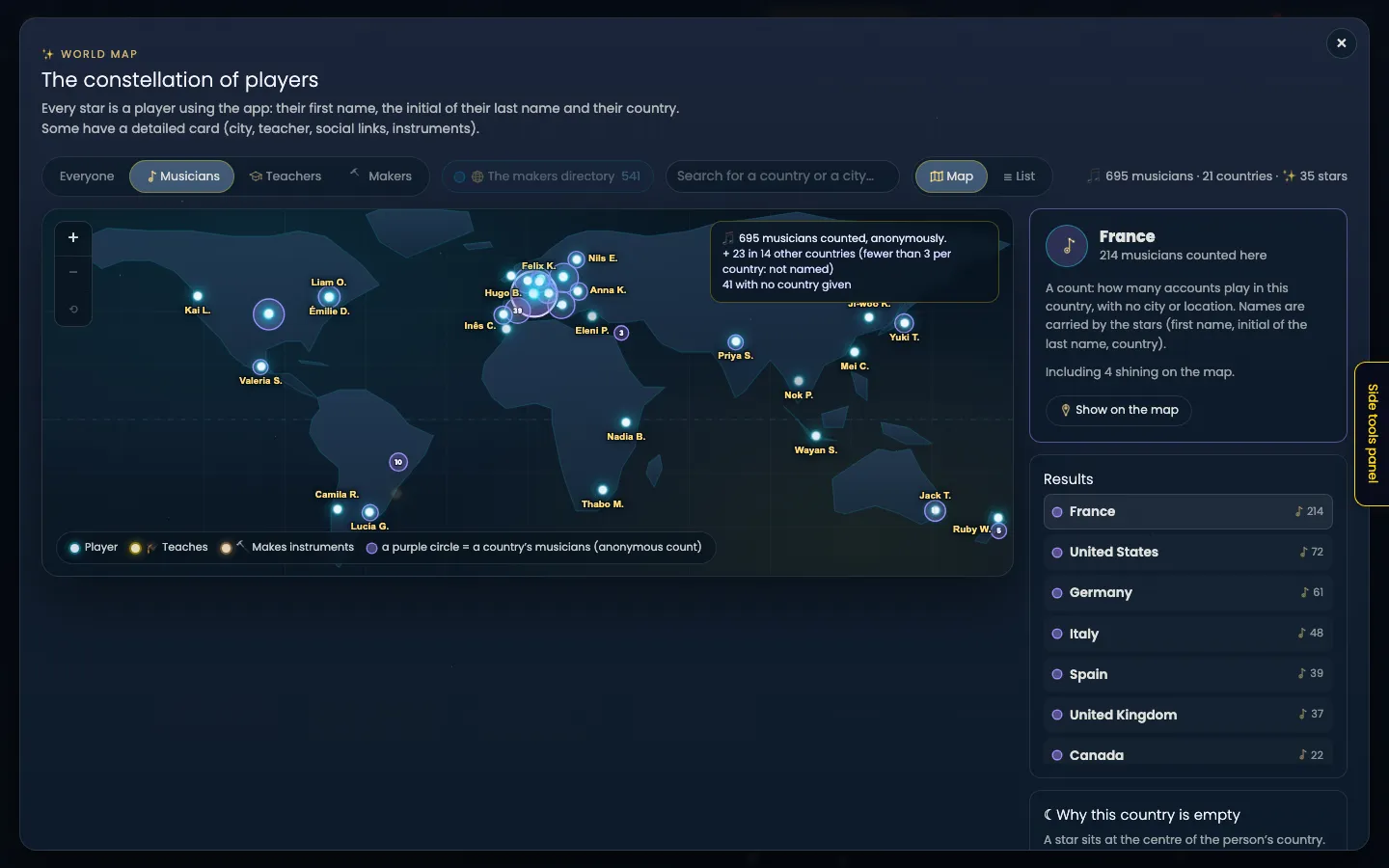
Click the image to open it, then click again for full size.
Find a handpan teacher, a player, a maker near you
That’s what the map is for. A search (“Search for a country or a city…”), zoom, and a 🗺 Map or ☰ List view you can sort by name or by country. The “Teachers” tab shows the golden halos; “Makers”, the copper ones.
On top of that, the ”🌐 The makers directory” chip switches on a separate layer: 541 makers listed, across 53 countries, one blue circle per country, its size saying how many. These aren’t stars: nobody signed up there. The app says so: it is “a map of the craft, not of people”. Click a circle to get the country’s workshops and their websites.
Click the image to open it, then click again for full size.
A map that looks good from the first stars
Every community map starts out almost empty. I wanted this one to look good from the very first sign-ups, not only at a thousand: when there are few stars, they carry their name, written in gold. As they multiply, the map writes every name that has room to show, and the others appear on hover or when you zoom in.
And the map says what it shows. A country with no star isn’t necessarily a country with no players:
“A star sits at the centre of the person’s country. An account with no country given is not placed: an empty country is therefore not necessarily a country without players.”
What you see are the app’s players. Not a census of the handpan worldwide.
A dated landmark, for the record: on 1 September 2026, the constellation had one star. Just one, a teacher, golden halo. Since 22 October, every player who accepts the terms has their own.
Why “constellation”
In Handpan Constellation Studio, a chord is a Constellation: notes that look like nothing on their own, joined by lines, forming a shape the eye takes in at once.
The map does the same thing, one level up. The points are no longer notes, they’re people. They already existed, scattered, unaware of one another. The map doesn’t create them: it draws the lines. Hence the sky, the barely sketched continents and the points of light, rather than a road map with red pins.
How to get there
In the app, open your account menu, section “Me & the community”:
- ”✨ The constellation of players” opens the map;
- ”🎧 My public profile” opens your star and your detailed card, with the preview alongside, and a ”✨ See the map” button.
The map is for signed-in accounts only: it shows people, it isn’t a public page. In “My public profile”, the “My card can be seen without an account” box prepares for the day part of the map might become public. Today it changes nothing, and nothing becomes public on its own.
The screen ends with a note I sign: “Thank you for keeping this small world alive. — David”. If something is missing or bothers you on this map, tell me from inside the app. A map of people is the kind of feature nobody can design alone in a corner: the questions it raises are raised for the people on it.
Ready to make your colours sing?
Try the app for free, or discover the electronic Neotone handpan.