Handpan Constellation Studio on your acoustic handpan (free)
Handpan Constellation Studio's acoustic mode shows YOUR scale in colour on your own handpan and teaches you chords. Free, no Neotone needed.
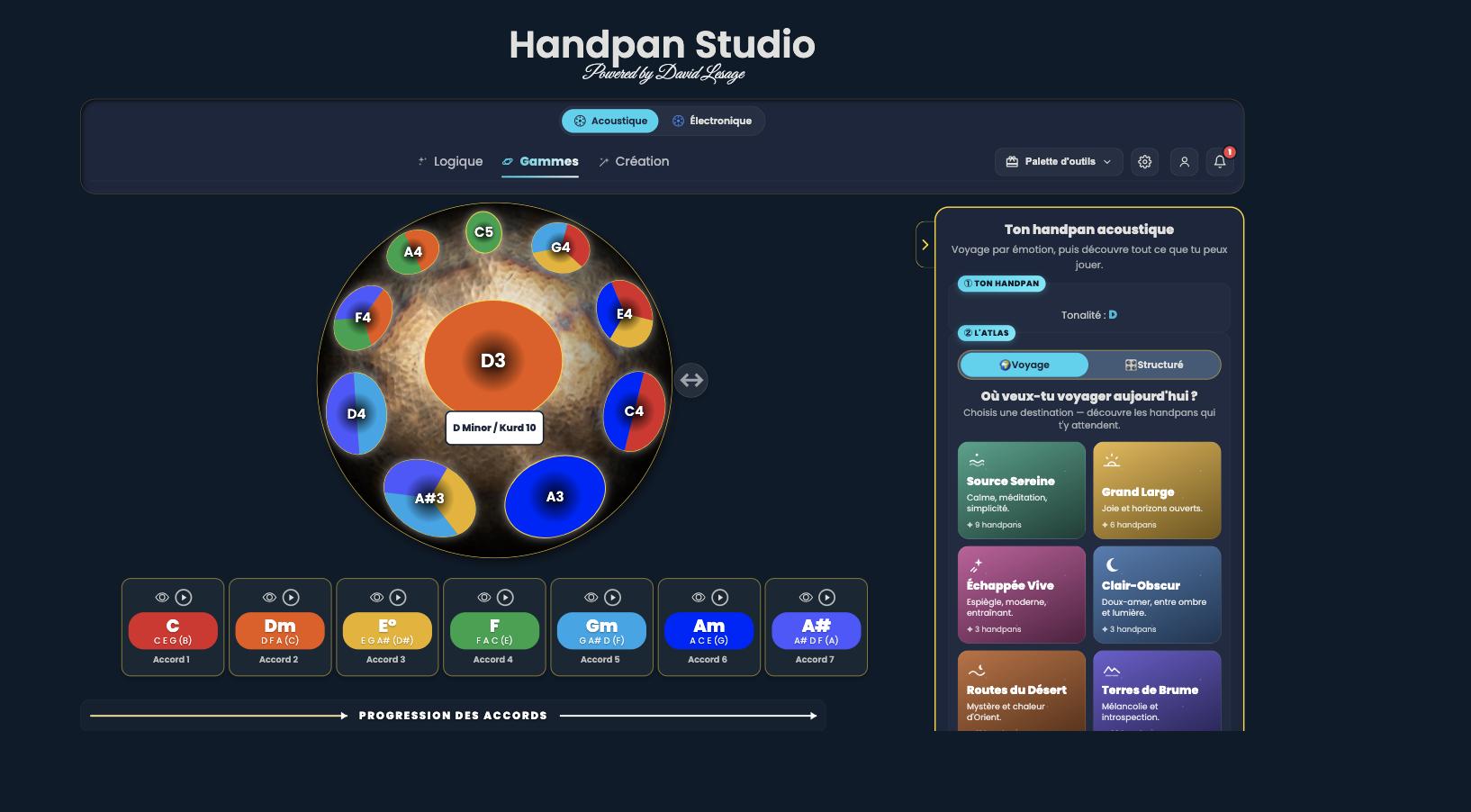
This article is about the acoustic handpan. If you play an electronic one, the same colours and Constellations are waiting elsewhere in the app — here we are talking about your hammered pan.
Already own an acoustic handpan? Handpan Constellation Studio’s acoustic mode is made for you, and it’s free. You tell it your scale, the app shows your pan in colour on screen, aligned with your instrument. You see your notes, spot your chords, learn by looking — with no need for an electronic Neotone handpan.
Your pan, in colour, on your screen
The idea is simple: you choose your handpan’s key and scale, and Handpan Constellation Studio draws the exact same layout on screen, each note dressed in its ChromaKey. The screen becomes a coloured mirror of your instrument. You look at the screen, you place your hands on the pan, and the connection happens on its own.
It’s the same visual method described in Playing handpan by colours, applied to your very real instrument. No electronics required: just your pan, your phone or computer, and the desire to progress.
What acoustic mode gives you
Recognising your notes
No more “which one was that again?”. Every note has its stable colour. In a few sessions, you link colour and sound without thinking, and you find your way around your pan almost with your eyes closed.
Learning chords
The app shows you the chords of your scale as Constellations — those geometric shapes that link the notes. You see which triangle, which path to play, and you find the chord elsewhere on the pan because the shape is recognisable at a glance.
Creating and exporting — for free
In acoustic mode, creating coloured layouts and exporting your visuals are free (exports always carry a discreet watermark). You can compose your own reading of a scale and keep it in front of you. To go further, discover how scale creation works.
Bottom notes: a star around the pan
Many acoustic handpans have bottom notes — the notes under the instrument, around the lower opening. Handpan Constellation Studio supports them and shows them as a star (Notepan style): they form a ring around the main pan, outlined with dashes, so you can see everything at a glance:
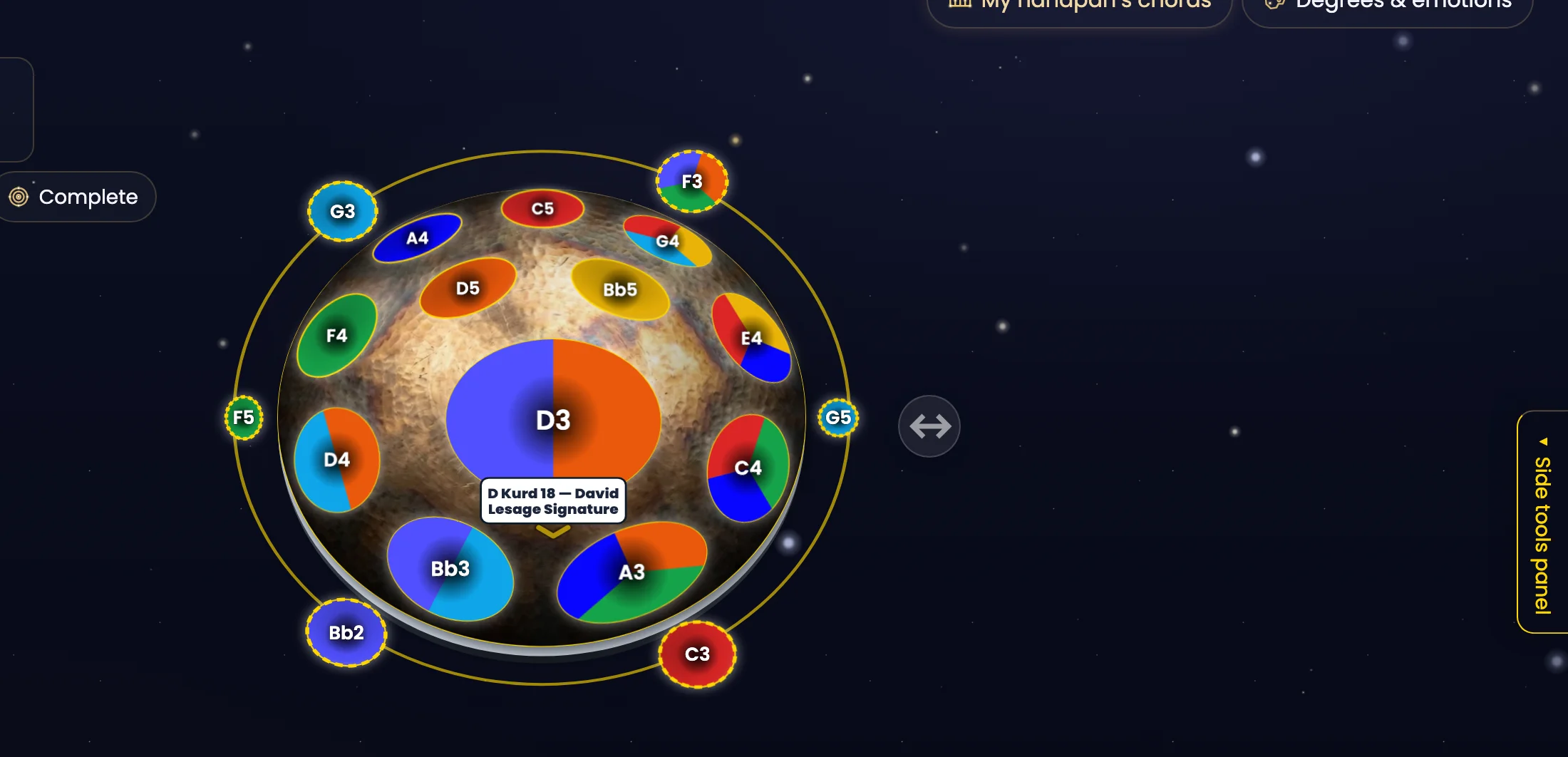
On a rich scale like this D Kurd 18, this view makes all the difference for finding your way around: the bottom notes stay in their place, around the pan, without hiding the ones on top. The “two shells” display, which drew the underside as a second pan set alongside, was removed from the app at the end of August 2026: only the star view exists today.
What has changed since, and where to start
This article dates from July 2026. Since then, acoustic mode has reorganised itself around three doors, all free. The right-hand panel has become a rail of five landmarks, always in the same place: ⏯ Playback & tempo · 🎛 Voicings & Logic · 🎓 Learn · 🧭 Explore · ⋯ More (updated 23 October 2026).
My handpans. All your instruments, as cards, with their real drawing. At the top, 🤝 My duo has two slots to play two of them together — that’s the whole subject of Acoustic duo: two handpans that become one.
🎼 Chord workshop → ✨ Reveal. The chord workshop opens in a panel on the right, without hiding the pan, arranged in three tabs: Explore, Build and Key. The ✨ Reveal button opens, full screen, the answer to the only question that matters at the start: what does my handpan already know how to do? — how many chords, which ones, and how many pieces of the repertoire they let you accompany.
🎯 Complete your scale. A pill under your handpan’s name, showing ”· N missing notes” when that’s the case. It opens the funnel that compares your real notes with what the chords ask for, and tells you, chord by chord, what is missing — then what a second instrument would unlock.
Free now, more later if you want
Acoustic mode gives you the essentials at no cost: visualise, learn, create, export. Your personal library is saved to your account, even on the free tier; some advanced functions belong to the paid plans, but nothing forces you into them to get started. You can experience real progress while staying on the free tier.
Your acoustic handpan is waiting for just one thing: to become visible. Open Handpan Constellation Studio, enter your scale, and watch your instrument light up with colour. And if you’d like some guidance, David Lesage’s lessons start from the very beginning, at your own pace.
Ready to make your colours sing?
Try the app for free, or discover the electronic Neotone handpan.