Playing two handpans together: what a second handpan gives you
A second handpan, acoustic or Neotone? The app asks what you want to do with the pair, shows the chords you can only play together and keeps your pairs safe.
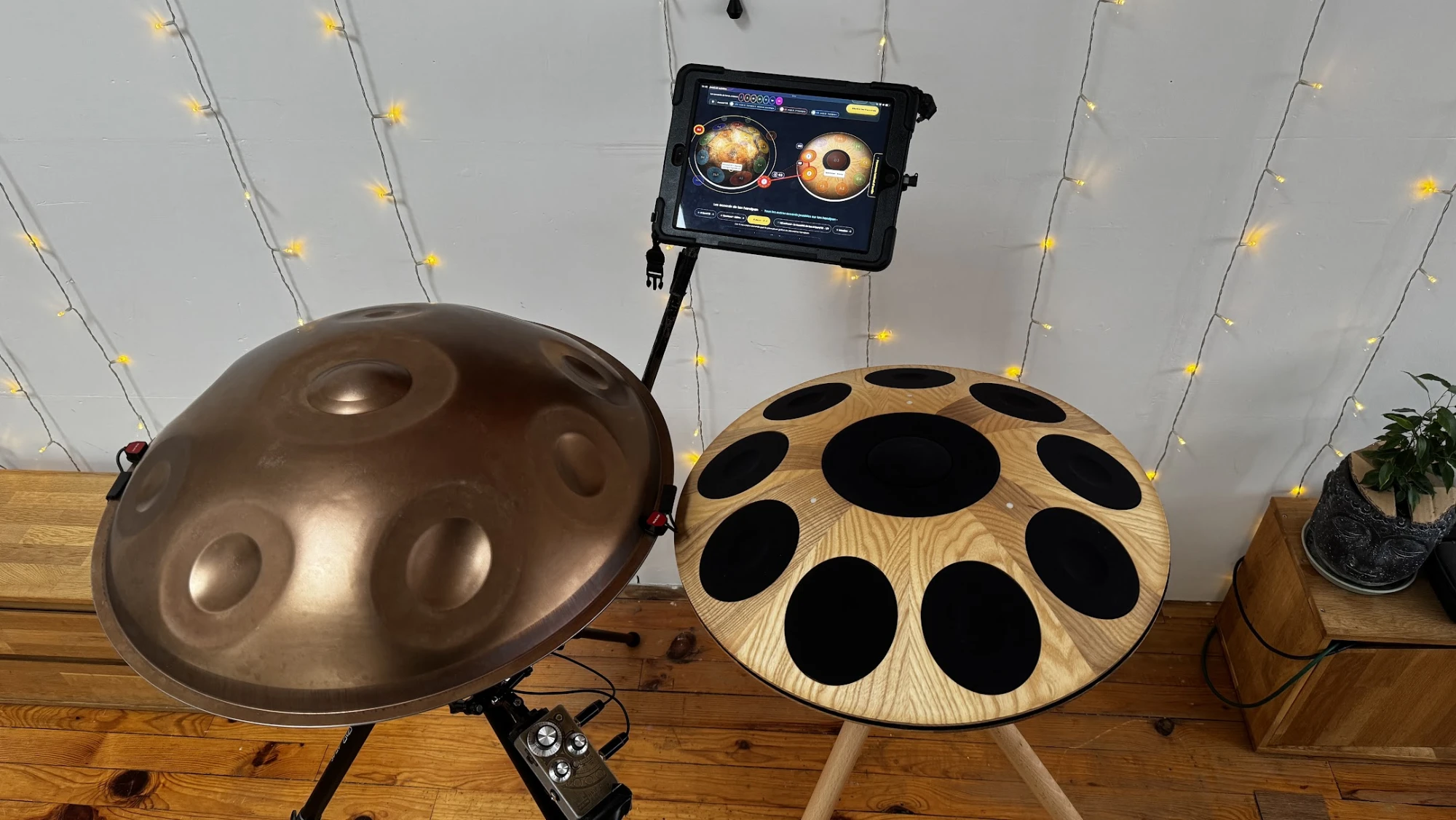
You own a handpan, and you wonder what a second one would give you. It can be acoustic or electronic: a Neotone. In Handpan Constellation Studio, two handpans placed side by side become a single instrument: one chord can take a note on one pan and two notes on the other.
This article covers the three kinds of duo: the acoustic duo (two acoustic handpans), the hybrid electro-acoustic duo (one acoustic and one Neotone) and the electronic duo (two Neotones). Sections specific to one of them say so in their title.
Placing your two handpans side by side
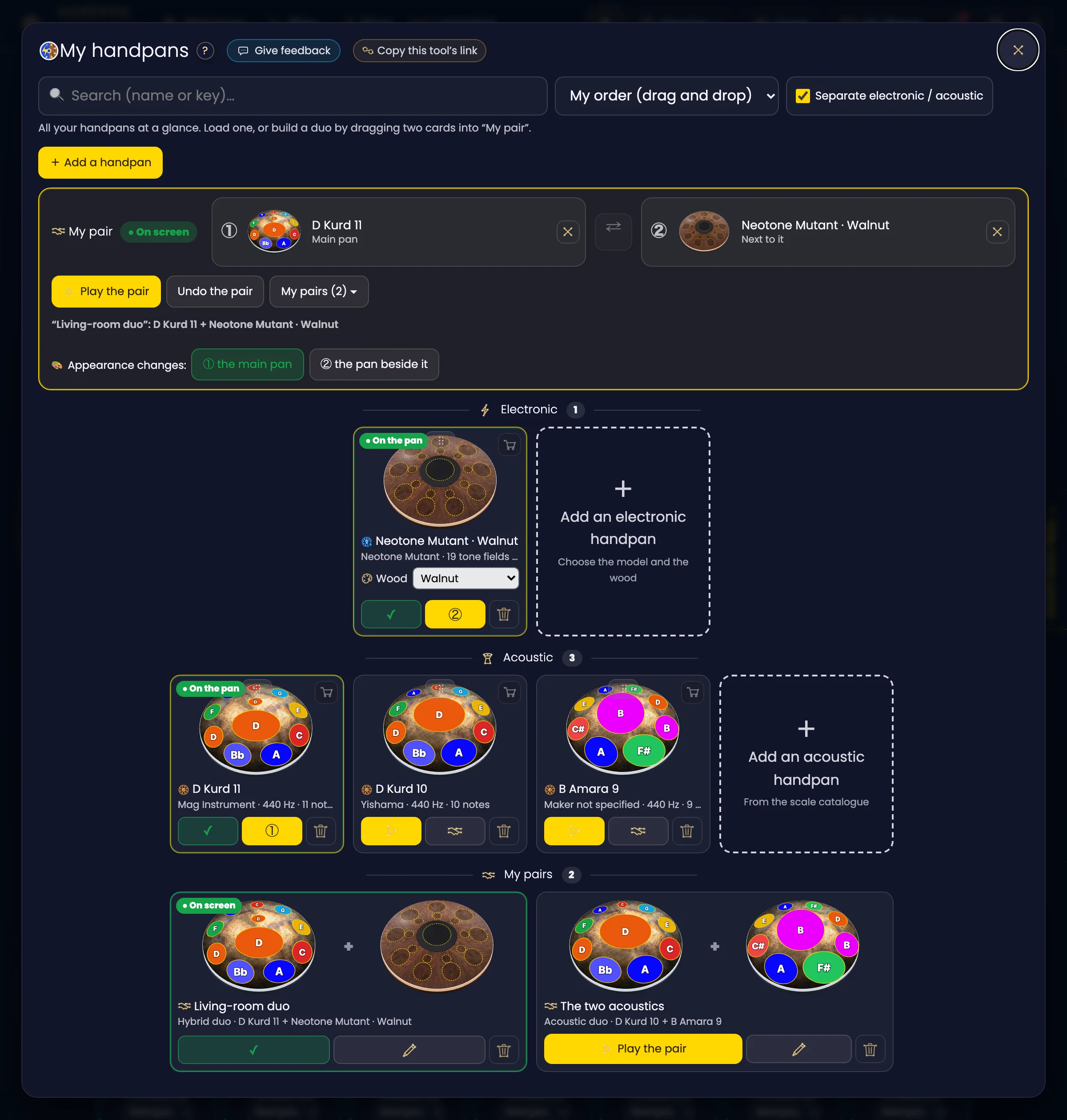
It all starts in My handpans (“Change instrument ▾” › My handpans). At the top, 🤝 My pair has two slots, ① and ②. Drag two cards into them, then click ▶ Play the pair.
The two handpans appear side by side, each with its own notes. A duo can be acoustic (two acoustic handpans), hybrid electro-acoustic (one acoustic and one Neotone) or electronic (two Neotones).
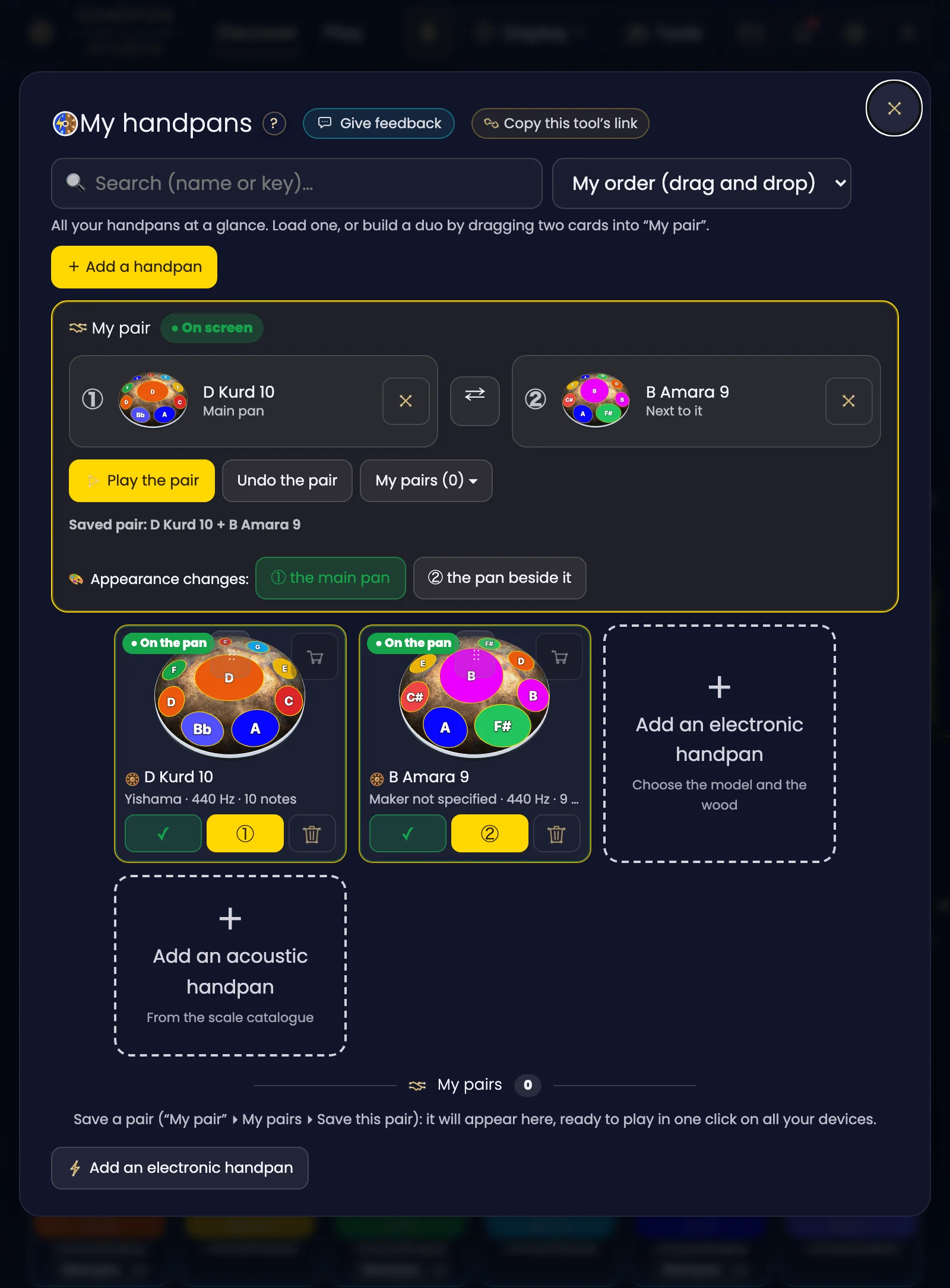
Click the image to open it, then click again for full size.
The chords you can only play together
Under the two handpans, the app lays out the chords in two rows of cards.
The first row holds the 7 chords of your key. Most of the time, your first handpan already plays them on its own. Each one carries its emotion: Balance, Momentum, Adventure, Relaxation, Tension, Nostalgia, Mystery.
The second row is the real novelty: “On top of that, thanks to your two handpans together”. These are chords that neither handpan plays alone. Each card says it in one line: ⚡ only together.
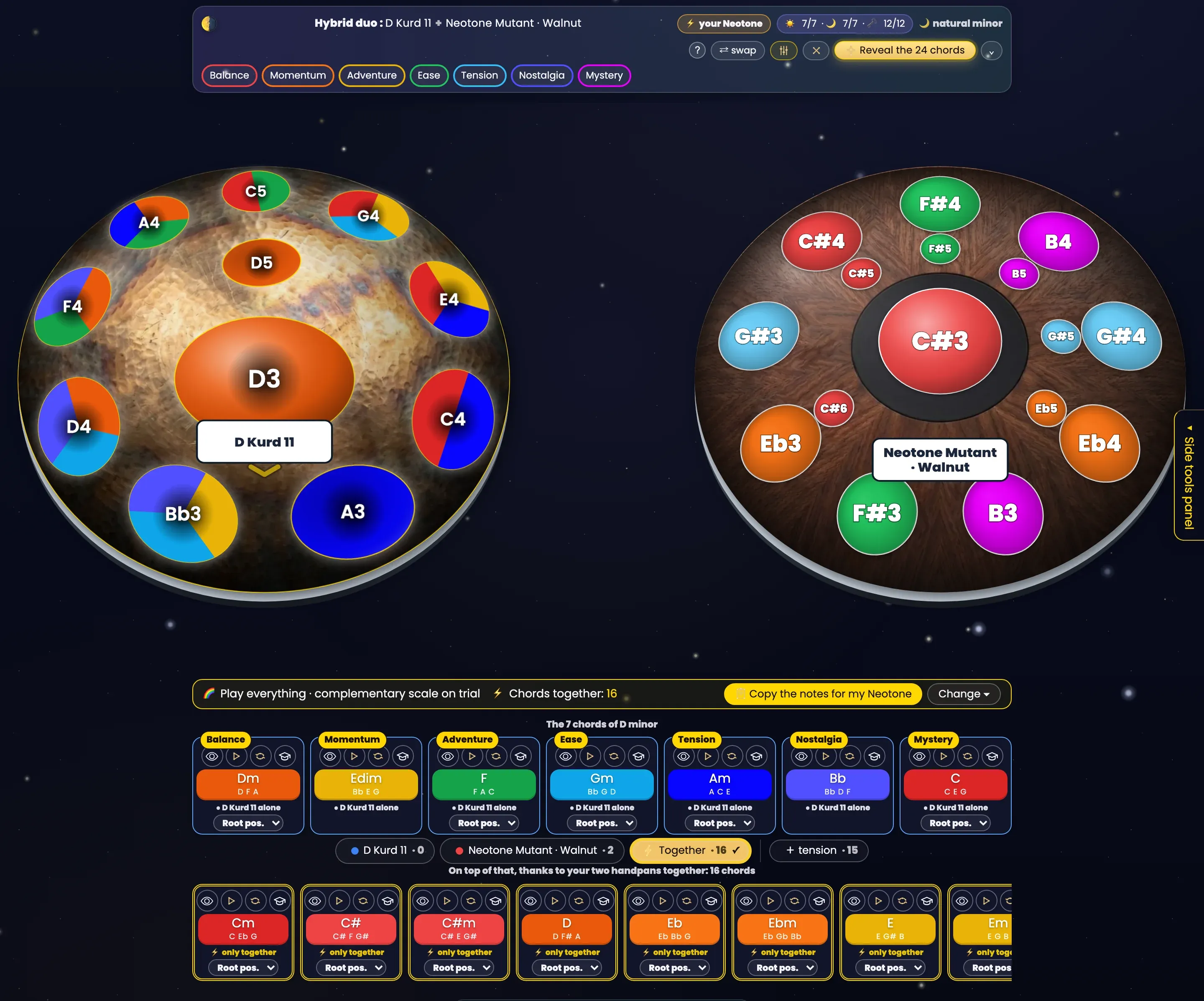
Click the image to open it, then click again for full size.
Click a card’s eye: the chord lights up on both handpans. Its notes take the chord’s colour and carry a number, in the order you play them. A line joins the notes from one handpan to the other, and the other notes dim while keeping their names.
The menu under each card picks the chord’s voicing: Root pos., Root+8, Inv. 1 or Inv. 2. The eye, the sound and the learning view follow that choice.
The 🎓 opens the chord’s learning view on both handpans. A “Full view” button enlarges it, for a clean photo for example.
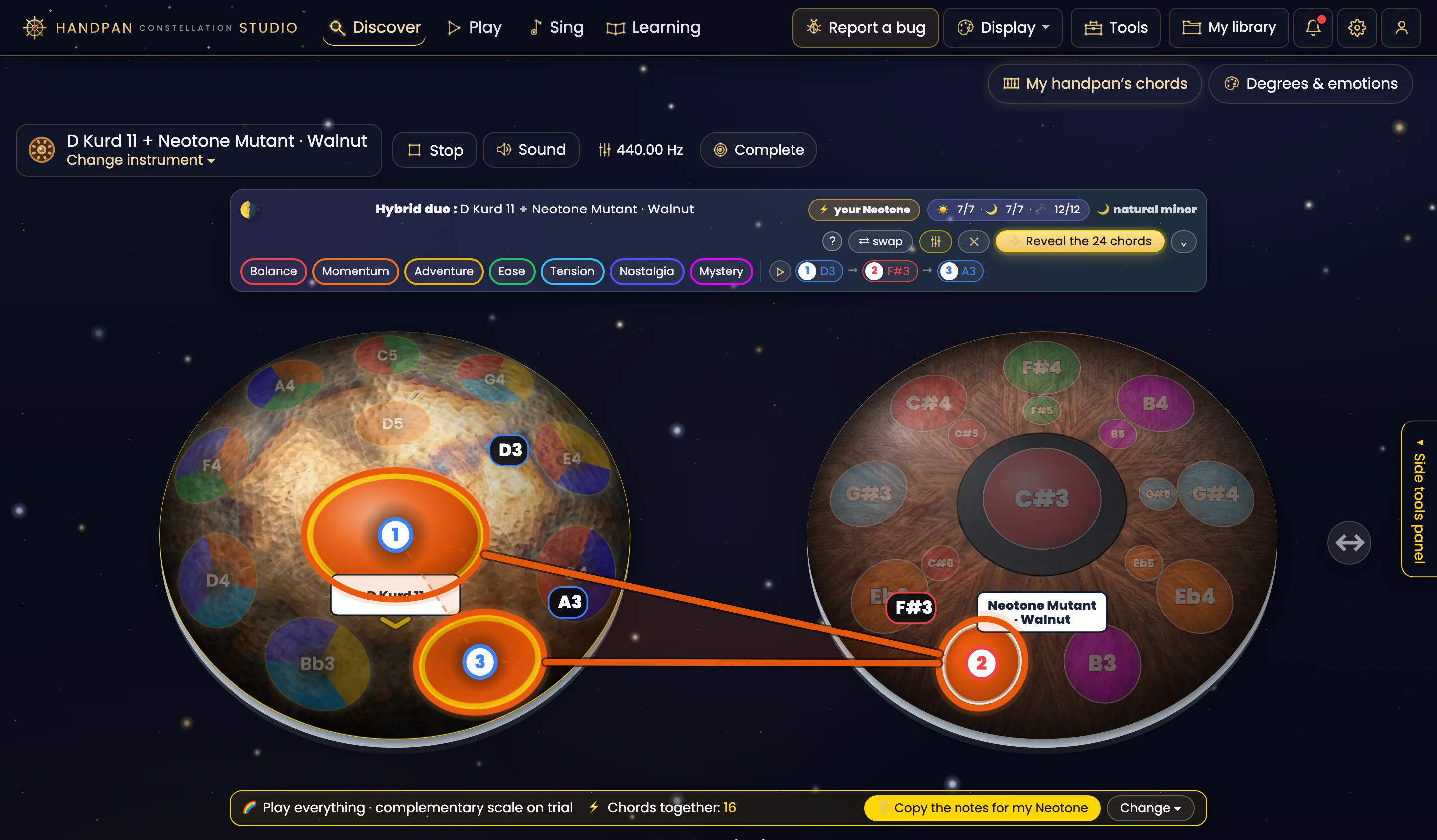
Click the image to open it, then click again for full size.
Hybrid electro-acoustic duo: “What do you want to do with these two handpans?”
This section is about the hybrid duo: one acoustic handpan and one Neotone. The notes of an acoustic handpan are hammered into the metal: they do not change. A Neotone’s notes do: any pad can take any note.
That is what lets the Neotone complete your acoustic handpan: the app suggests the scale that fills in what yours is missing.
As soon as both handpans are on screen, the app asks: “What do you want to do with these two handpans?” Four answers:
- 🌈 Play everything: the scale that opens the most keys together.
- 🎵 Play a song: the scale that makes the chords of a song you pick playable. If you have done your vocal passport, it is worked out in your voice.
- 🎯 Complete my key: the scale that gives you, together, the 7 chords of your acoustic handpan’s key.
- ✋ Keep as it is: your Neotone keeps its scale. You can change your mind at any time.
Before anything changes, the app shows you what you gain: how many chords together, how many playable keys, and what stays out of reach with the number of notes on your model.
The question opens in full the first time. After that it fits on one line, and “Change” reopens it. Your choice is remembered for that pair of instruments.
The scale goes on trial first
With “Try this scale”, the new scale is set on the Neotone drawn on screen. The app says it plainly: your instrument is unchanged until you load it. “Back to its scale” cancels the trial in one click.
To put it on your real Neotone, there are two ways:
- “Load onto my Neotone”, over the internet (Neotone Connection). This direct loading is reserved for Neotone beta testers for now. If your Neotone is offline, the scale is saved on your Neotone account and loads when you connect it.
- “Copy the notes for my Neotone”, in place of direct loading for everyone else: the app copies the notes one by one, ding first. Paste them into the Neotone app, and it is the same scale.
On a D Kurd 11 paired with a Neotone¹, for example, the app goes from no extra chord (the Neotone¹ repeated the D Kurd’s notes) to 16 chords together, and the playable keys go from 2 out of 24 to 24 out of 24. The detailed figures (why 24 keys, what separates a 10-note Neotone¹ from a 19-note Mutant, how much room is left for the melody when you sing) are in From 2 to 24 keys: completing your acoustic handpan with a Neotone.
Acoustic duo: what you can do with what you have
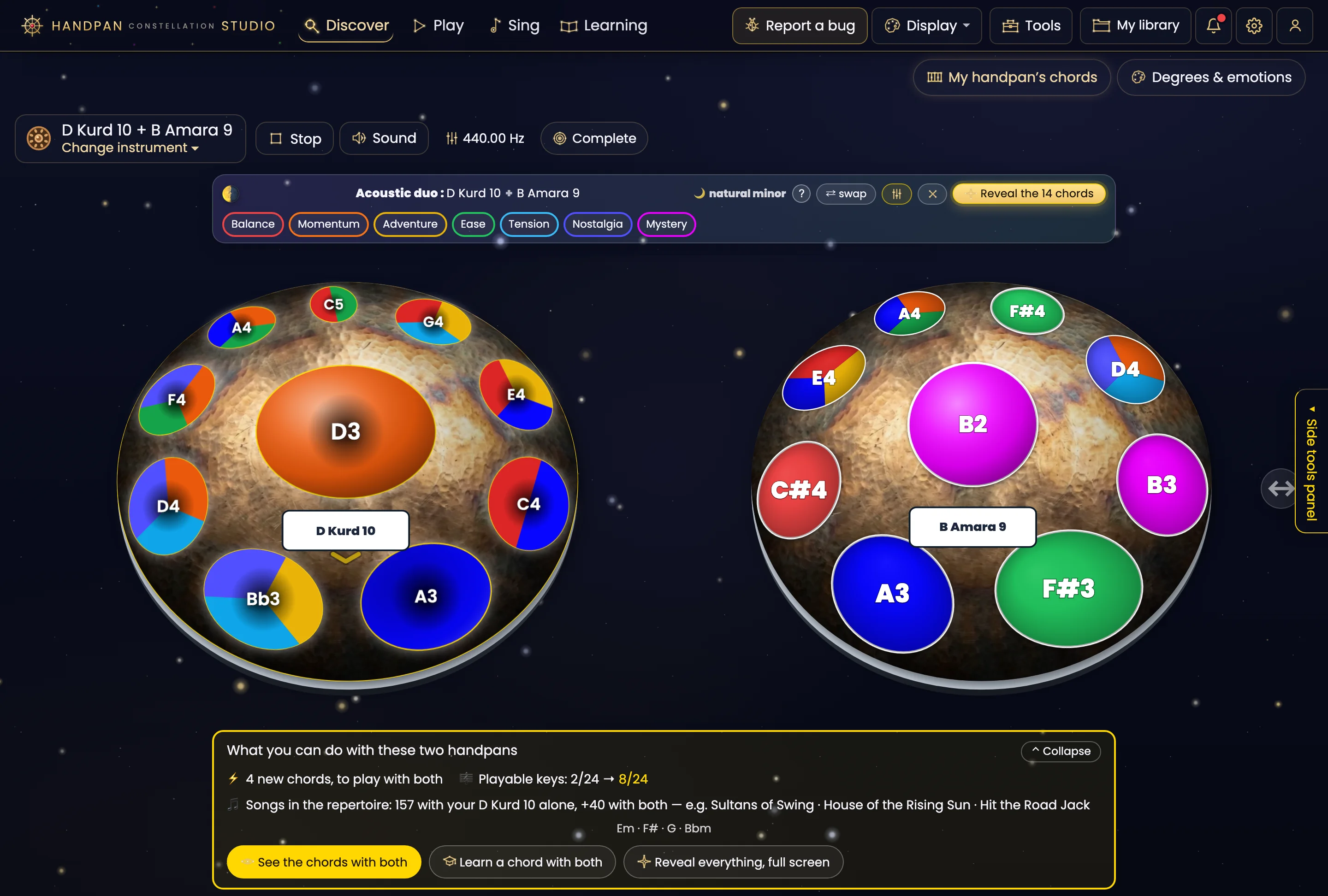
With two acoustic handpans, no note can change. So the app does not ask what to modify: it shows you “What you can do with these two handpans”.
You see the new chords to play together, the playable keys, and the songs from the repertoire that the pair adds to those of your first handpan. A “Learn a chord with both” button takes you straight to practice.
Click the image to open it, then click again for full size.
You don’t have the second one yet?
With a single acoustic handpan, the 🎯 Complete pill under your handpan’s name tells you what is missing. Its “Which 2nd handpan completes mine best?” button ranks the scales that complete yours. “Try this pair” places the suggested handpan next to yours, without saving anything.
On a D Kurd 11, for example, the app suggests a 12-note E3 major: together, 12 new chords, and the playable keys go from 2 out of 24 to 24 out of 24.
The missing-note calculation is solid. The number of songs a second handpan “would open” still relies on a small number of complete scores: take it as a hint, not an inventory.
The article Acoustic duo: two handpans that become one tells how the app got here, starting from the note that is always missing.
Electronic duo: each on its own pan
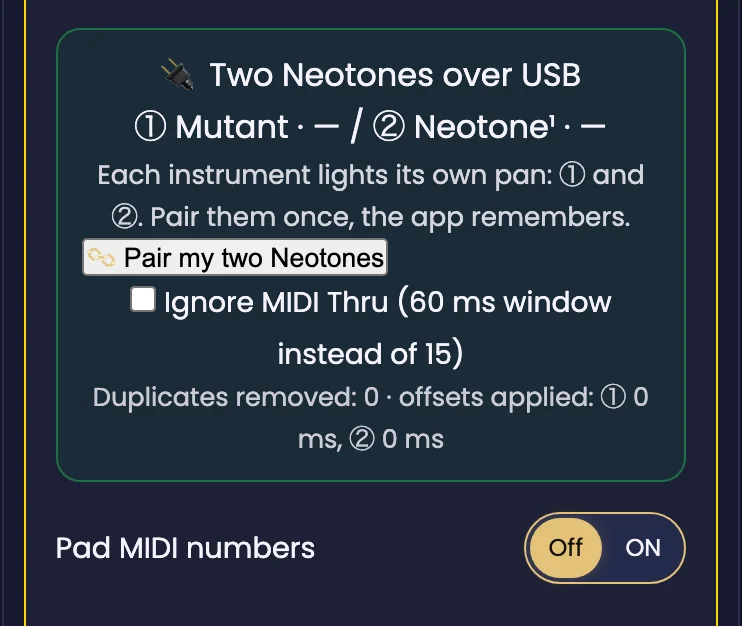
This section is about the electronic duo: two Neotones plugged in over USB, for example a Mutant and a Neotone¹.
In the Midi connect tab, “Pair my two Neotones” asks you to tap a note on one, then on the other. From then on, each instrument lights up its own pan, ① or ②, and the app remembers it the next time you plug in.
Hits received twice are discarded. Your MIDI recordings keep one track per instrument. And in “Learn a chord”, hits on the second Neotone count too.
Two limits to know before plugging in. Midi connect only appears from the Apprentice level up. And on iPad and iPhone, no browser gives access to MIDI: plug them into a computer or an Android tablet.
Click the image to open it, then click again for full size.
Your pairs follow you
In My handpans, the 🤝 My pairs row shows each saved pair in its own frame, its two handpans drawn side by side.
- ▶ Play the pair puts it on screen in one click, and the app asks again “What do you want to do with these two handpans?”.
- ✎ renames it.
- 🗑 forgets it. Your handpans stay.
Click the image to open it, then click again for full size.
Your pairs are saved on your account, even on the free plan. A pair saved on your computer shows up on your tablet, and a pair deleted on one disappears from the other.
If you reload the page mid-session, “Pick up where I left off” brings back your two handpans with the same choice.
Depending on your level
The app speaks to everyone in their own words. At the Discovery level, the pair question mentions neither keys nor note names: “Complete my key” becomes “Complete my chords”.
At Apprentice and Musician levels, chord and key names appear.
What a second handpan gives you, in short
- Acoustic duo: chords that neither plays alone, and the app tells you which ones.
- Hybrid electro-acoustic duo: the Neotone takes the notes your acoustic handpan lacks. On a D Kurd, that can open all 24 keys.
- Electronic duo: each on its own pan, over USB, on a computer or an Android tablet.
- In every case: your pairs on your account, ready to play in one click.
Open Handpan Constellation Studio, put your two handpans in 🤝 My pair, and look at the second row. To discover the Neotone, everything is on the Neotone page, and you can try it next to an acoustic handpan at the showroom.
Ready to make your colours sing?
Try the app for free, or discover the electronic Neotone handpan.