The app — an original project by David Lesage
Handpan Compagnon
Music becomes visible
A visual approach to music — through colours, emotions and geometry — to understand, memorise and play the handpan. On acoustic handpan as on Neotone.
Limited access · The app is not open to the public yet
The observation
The handpan has no visual notation
No notation shows the instrument
It’s a magnificent instrument — but how do you write it down? You learn by ear, by imitation, and past the first melodies you replay the same patterns: the instrument becomes a comfort zone you never leave.
On an electronic handpan, your bearings fade
The Neotone can switch scales endlessly — a strength, but a trap: the notes under your fingers are never the same twice. No fixed point — your brain overloads, as if you had to relearn the instrument with every scale.
Colours & geometry
What if we made the invisible visible?
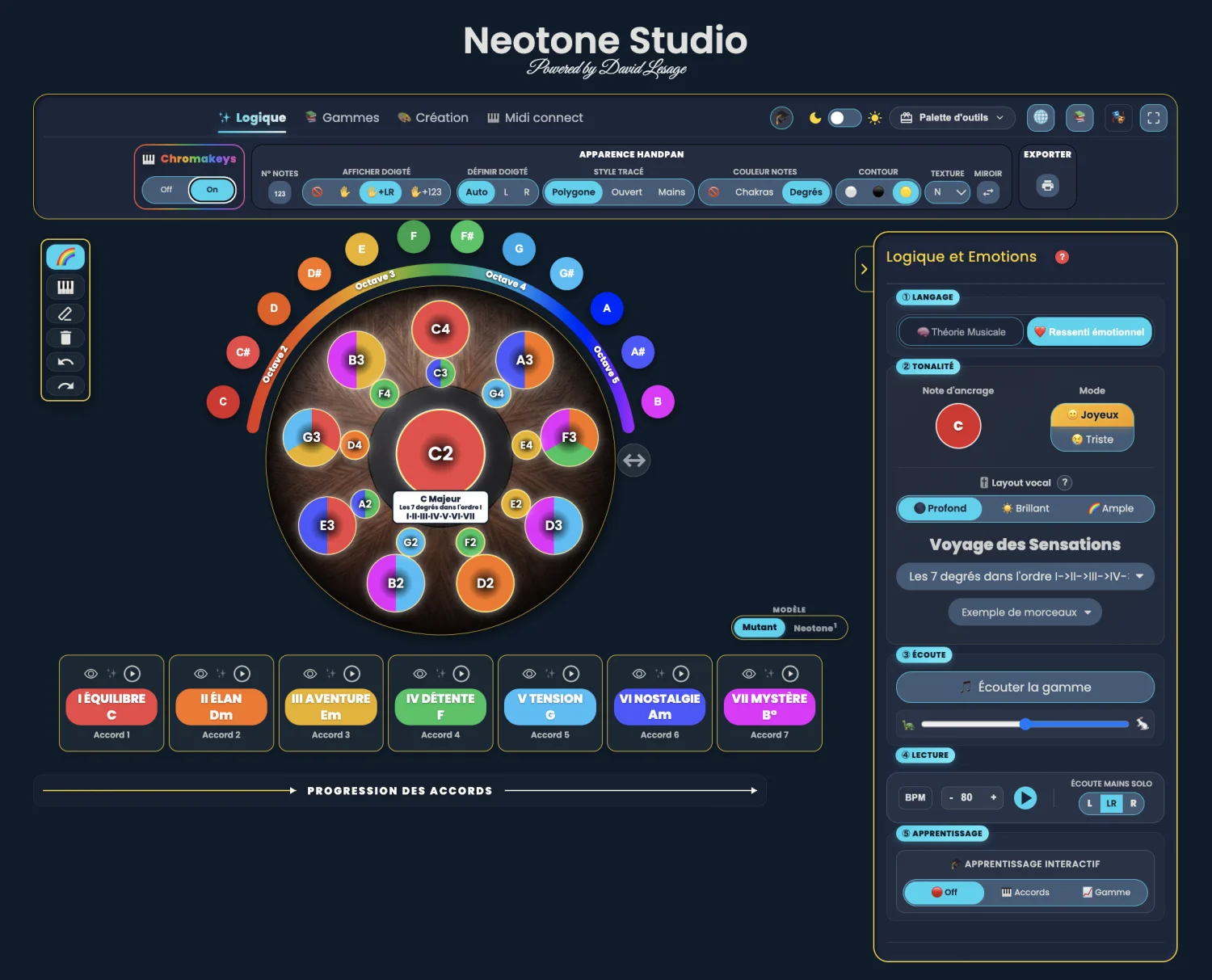
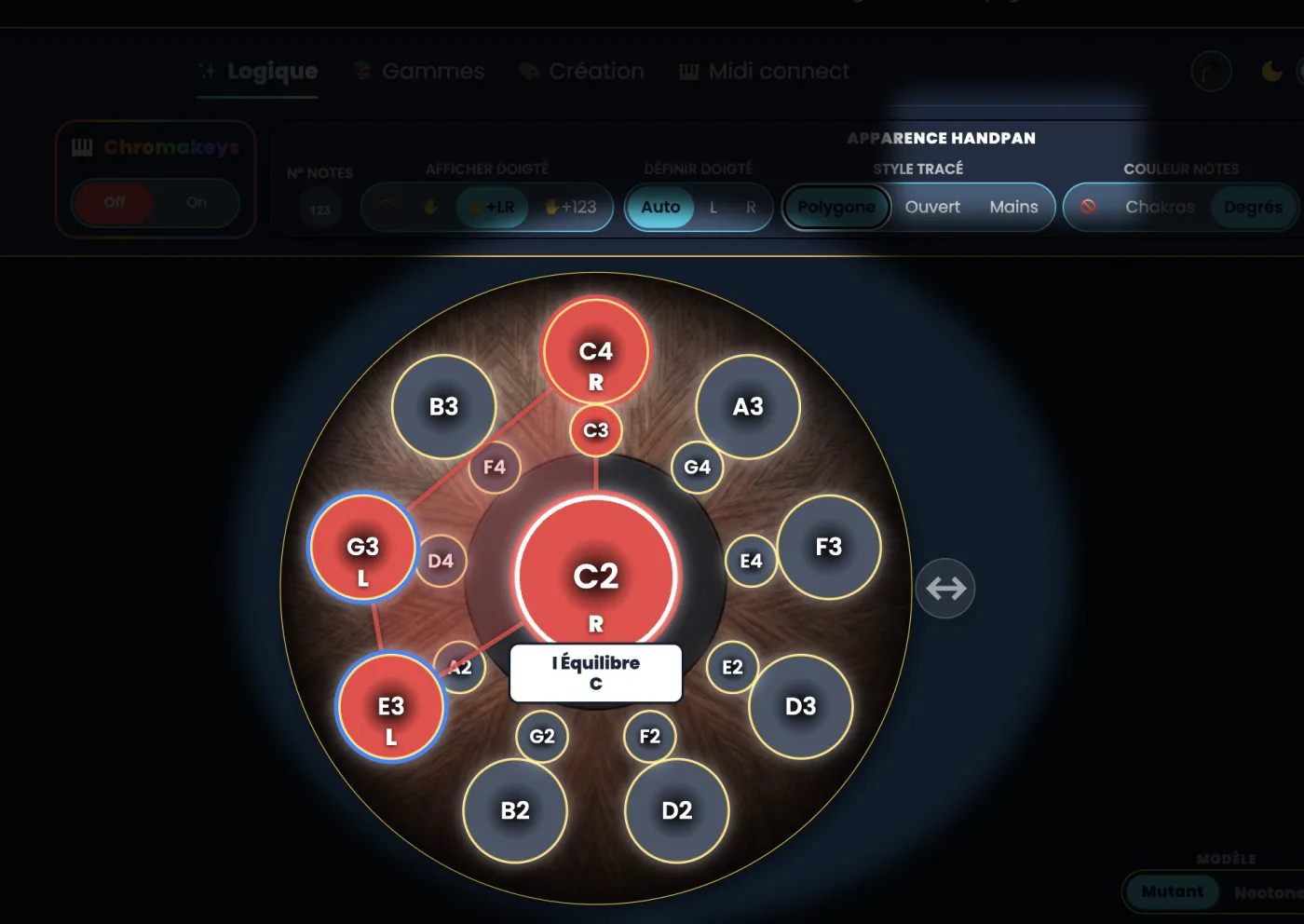
Instead of note names — which change constantly — the app shows the structure of music. The 7 degrees each receive a fixed colour, from red to violet: this is the ChromaKeys system. And every chord draws a glowing geometric shape.
I
Balance
II
Momentum
III
Adventure
IV
Calm
V
Tension
VI
Nostalgia
VII
Mystery
What was invisible becomes visible.
The language of Constellations
The handpan’s new visual tablature
Beyond the ChromaKeys colours, Handpan Compagnon links the notes of a chord: it draws a glowing figure — a constellation. Three ways to trace it.
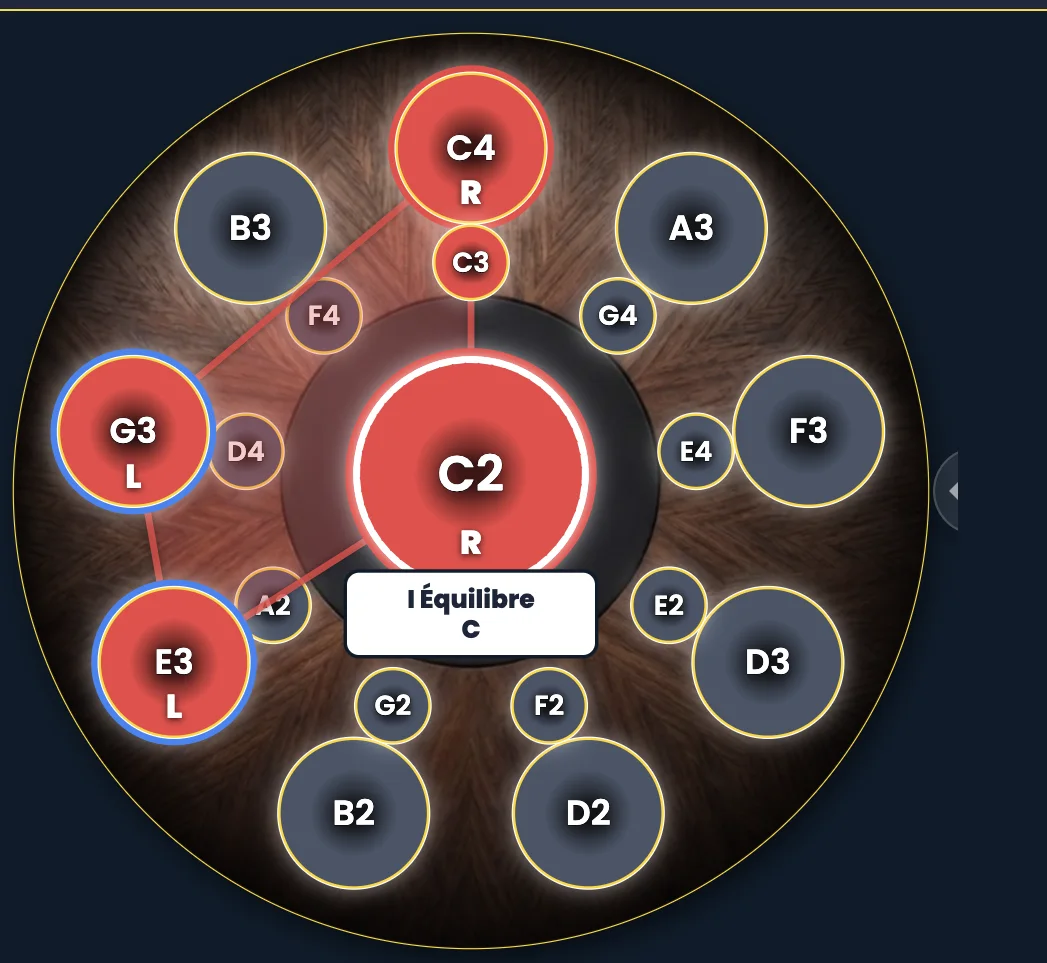
Polygon
The closed shape of a chord: all its notes linked. You recognise the chord at a glance, by its shape.
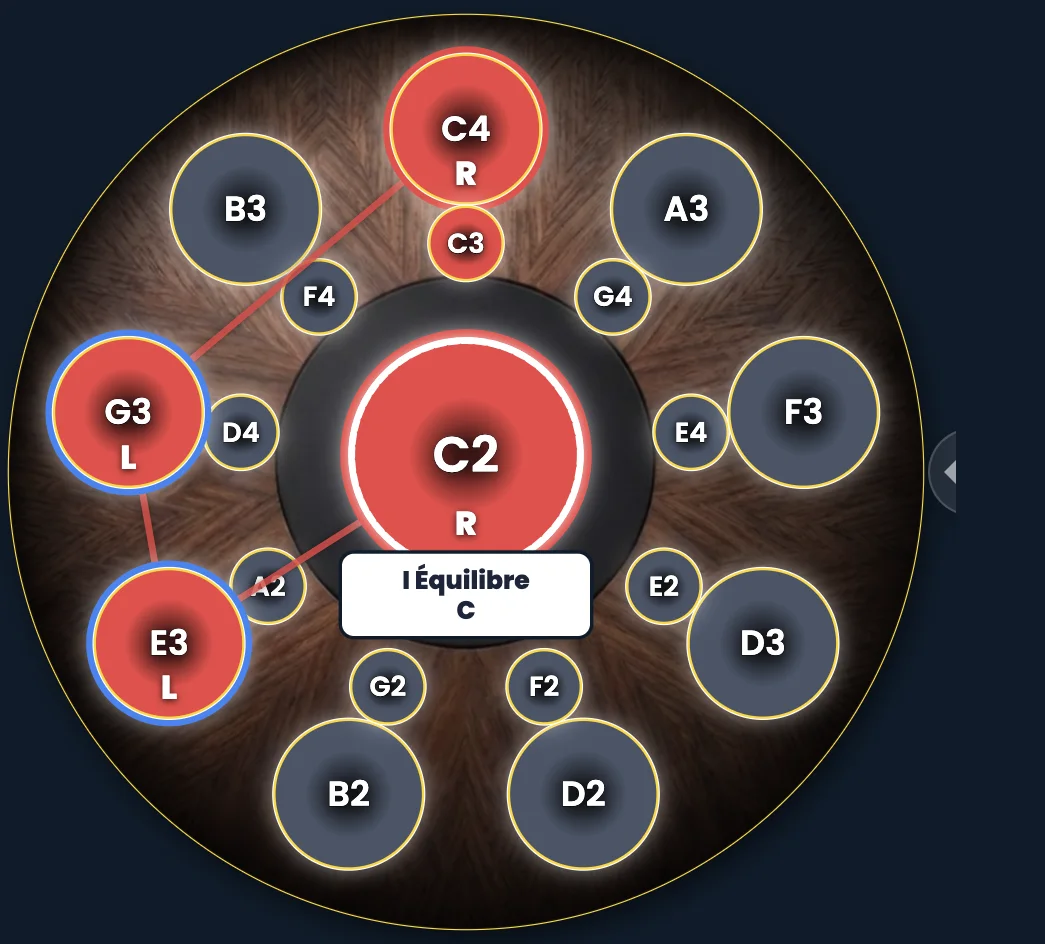
Open
An open trace that follows the path of the notes — ideal for visualising a hand movement.
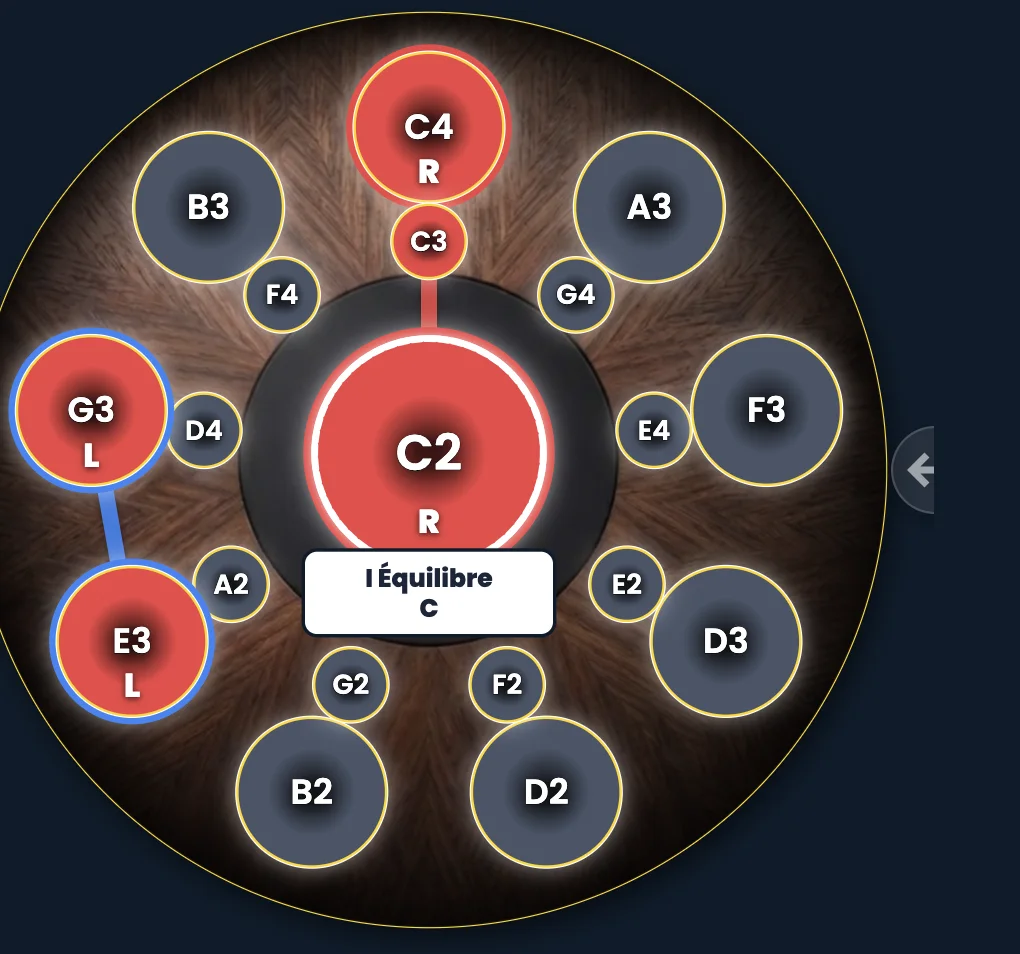
Hands
The trace designed for the gesture: which hand, which note. You read your playing directly.
Degrees & emotions
Each degree becomes an emotion
Playing a progression means telling a story: leaving home, setting off on an adventure, crossing a moment of tension, then coming back. You no longer memorise abstract rules — you feel, and you see.
The app, in four modes
The perfect companion for your instrument
The whole method fits into a single web app.
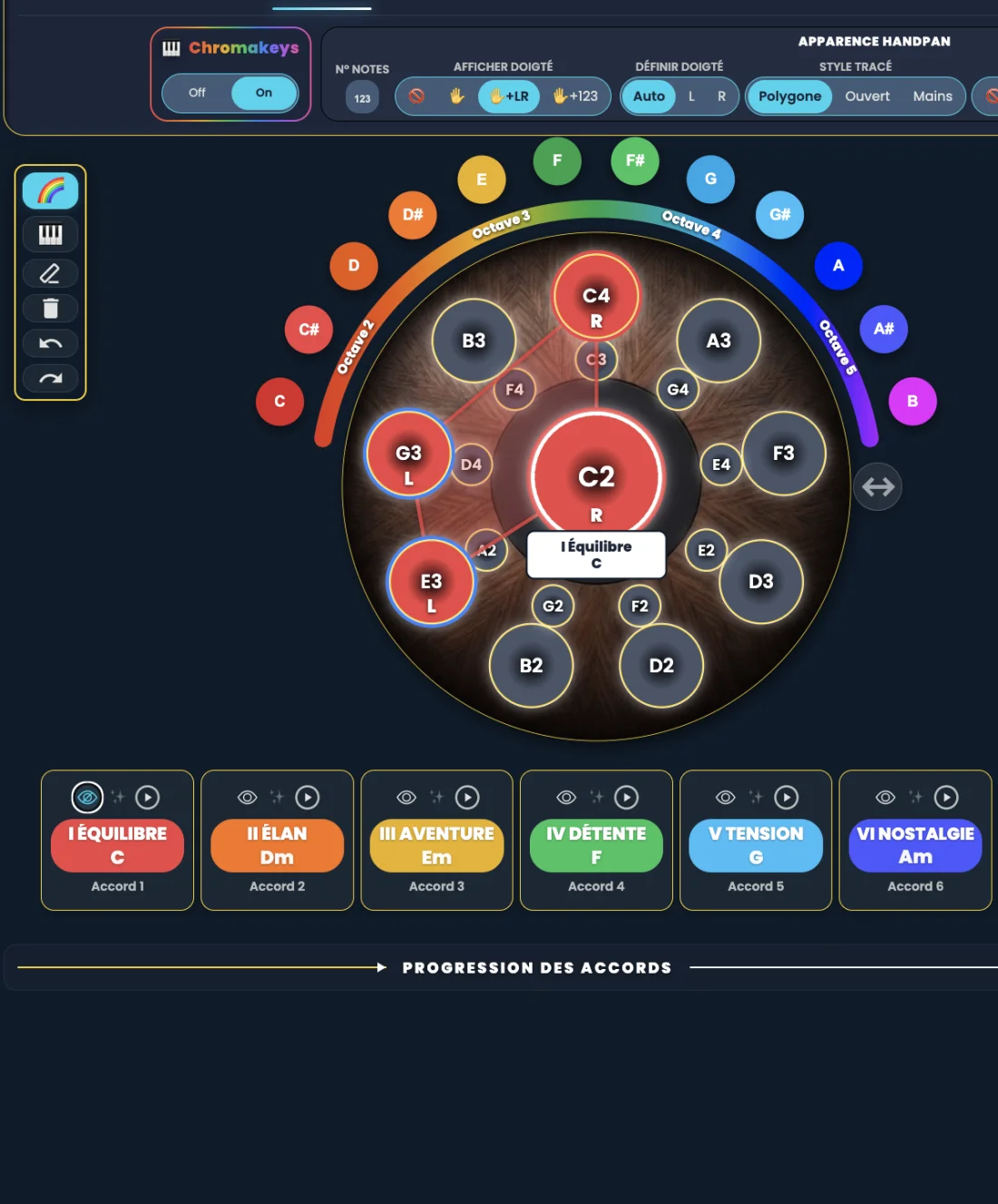
Logic
The heart of the app. Play the 7 chords of any scale, build your progressions, follow the chords of the songs you love.
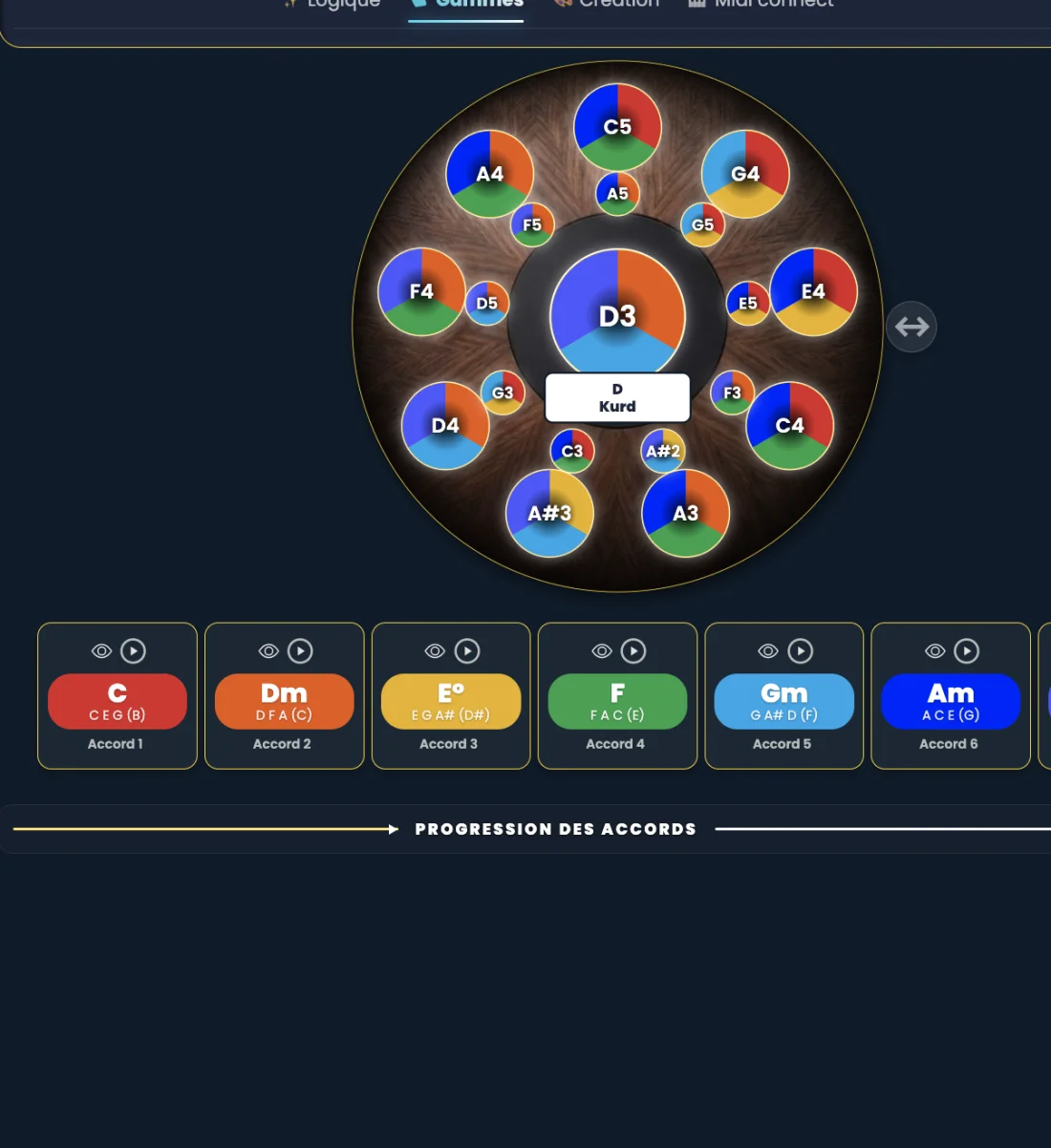
Sound Atlas
Explore scales from all over the world — Japan, the Orient, Africa, Celtic music… Listen to them, learn them, travel.
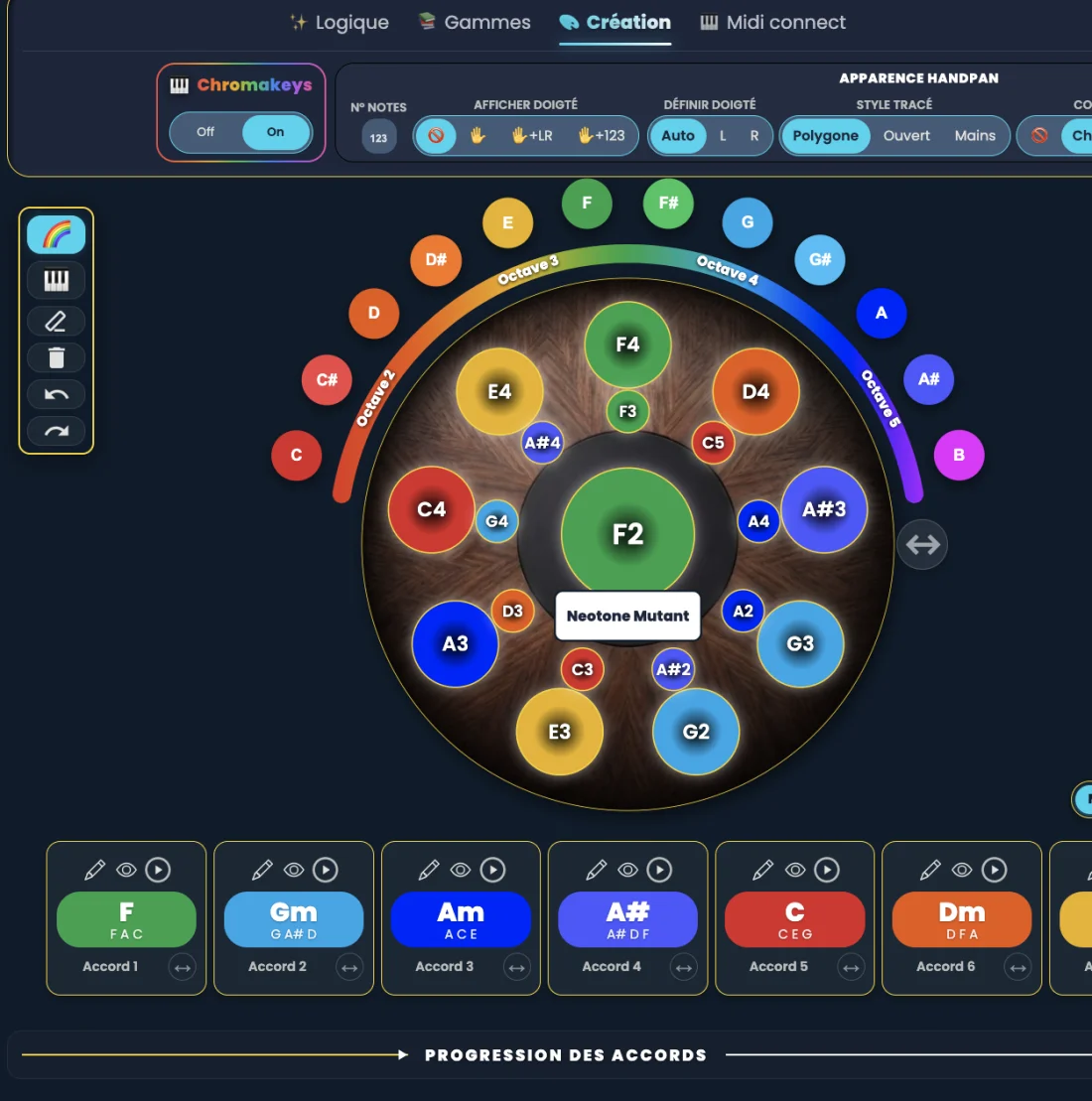
Creation
Compose your own custom scales, note by note and colour by colour, then keep them in your library.
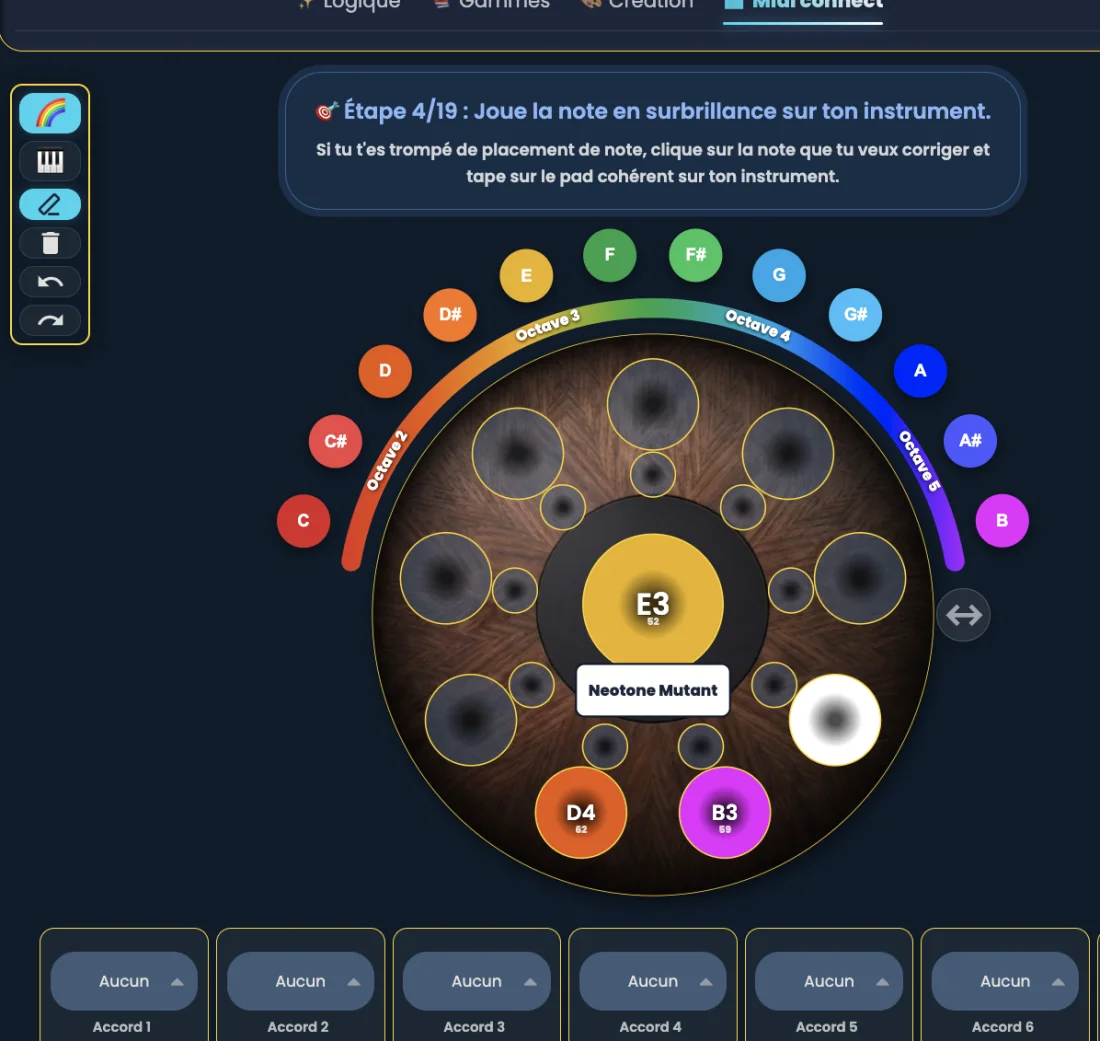
MIDI Connect
The bridge between your Neotone and the app: your real playing appears live on the virtual handpan, and the app guides you through your chords and scales.
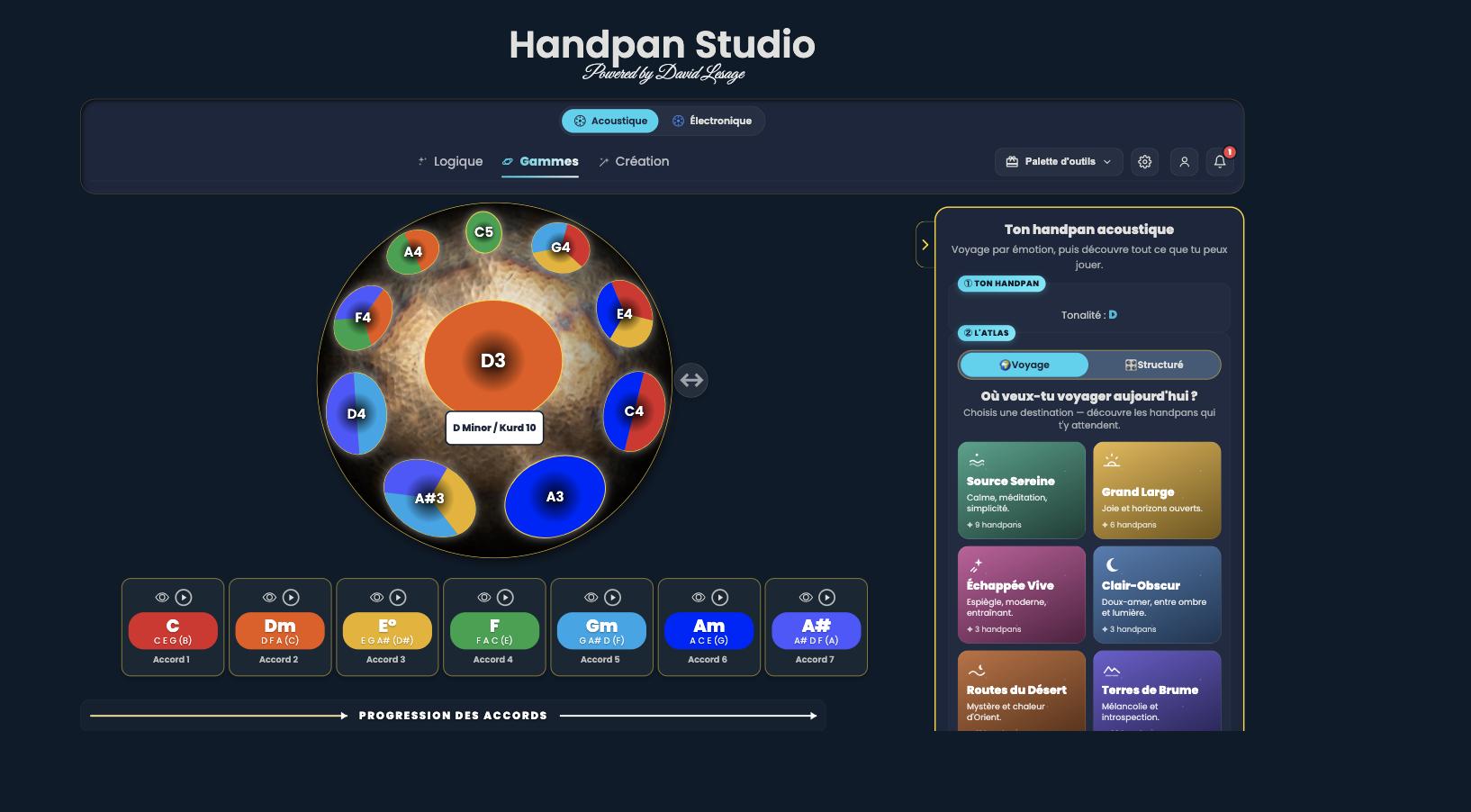
Acoustic mode
No Neotone? Your acoustic handpan is enough
Handpan Compagnon isn’t just for the Neotone. Switch on acoustic mode and get the whole visual approach — colours, constellations and emotions — mapped straight onto your own instrument. You finally see the music you play.
- ✦Your scale appears in colour on a photo of your handpan.
- ✦Learn new chords and progressions, guided step by step.
- ✦Explore an atlas of scales by emotion — and imagine your own, custom-made.
Neotone version
Link your Neotone to the app via MIDI: your playing appears live on the virtual handpan, and the app guides you through your chords and scales. Real-time MIDI integration.
The story — by David Lesage
The tool I wish I’d been taught as a child
When I discovered the handpan, I hit the wall of my childhood again: no method, and the difficulty of visually organising the paths of notes. Then, with the Neotone, a new difficulty: the notes change place with every scale.
So I built the tool I wish I’d been given: a visual approach to harmony, through colours, shapes and emotions — to understand, memorise, and finally sing while accompanying myself on the handpan.
It’s the logical follow-up to Now Groove, my rhythm method (2021) that makes rhythm accessible through visual emoticons. Handpan Compagnon does the same for harmony: a tool designed by a musician, to raise the handpan to the rank of an accompaniment instrument — like the guitar or the piano.
A living community
You’re not downloading an app — you’re joining a living project
Handpan Compagnon evolves constantly, shaped by the people who use it. Your feedback, sent in one click from the app, is read and directly shapes what comes next.
Constantly evolving
New features, scales and modes ship regularly, and they’re included. The app you use today will be even richer tomorrow.
Your feedback shapes the app
Straight from the app, you send your ideas and feedback in one click. Every message is read and steers the next updates.
A community, not a catalogue
You join a movement: making music visible and accessible. Together we build the tool we all wish we’d had as children.
The app in motion
See Handpan Compagnon in action
Twelve video demos of the app — tap a thumbnail to play it full screen.
Choose the key
Set an anchor note (here C) and the 7 coloured degrees appear.
Hear the scale
The app plays the scale note by note on the handpan.
The degree’s eye
Tap a degree’s eye (here the I) to isolate its chord.
Bonus notes
Beyond the 7 degrees, extra notes appear marked with a star.
Drawing styles
One Constellation, three ways to read it: Polygon, Open or Hands.
Transpose
Move the anchor note (C → F): the chord shape stays in place.
Colour ↔ chakra
Each degree carries the colour of its chakra.
Fingerings
The app suggests a left-hand / right-hand fingering.
Play the chords
Hit play: each degree lights up in turn and its chord blooms.
Interactive learning
The handpan becomes a guided surface: touch a coloured note.
Sound Atlas
Browse a library of scales from around the world.
Creation
Compose your own scale on the chromatic wheel.
FAQ
The questions people ask me about Handpan Compagnon
Do I need a Neotone to use Handpan Compagnon?
No. Handpan Compagnon works on any acoustic handpan, in the free acoustic mode, just as it does on the electronic Neotone handpan. You do not need the electronic instrument to get started.
Does Handpan Compagnon work on an acoustic handpan?
Yes, the acoustic mode is free. You visualise your scale in colours and learn your chords directly on your own acoustic instrument.
What are ChromaKeys?
They are the method’s colour system: each note is given a fixed colour. This lets you see the structure of the music at a glance, with no music theory required.
What is a chord Constellation?
It is the method’s visual tablature: each chord draws a geometric shape connecting its notes. You recognise and memorise your chords by their shape.
Is Handpan Compagnon free?
Handpan Compagnon bundles a lot of features, and it’s your use that decides what’s free and what isn’t. Learning the handpan on your own, on your own acoustic instrument, is free: seeing your scale in colour, recognising your chords, playing, creating and exporting your scores. What goes beyond your personal practice is paid: the electronic Neotone/MIDI mode, advanced creation, cloud saving. And if you use it as a working tool in lessons you charge for, that’s a Teacher Licence — with the student space, the exercises and watermark-free scores that come with it. Up-to-date prices are just below.
Pricing
Discovery, or Studio
Start for free with Discovery. Upgrade to Studio to unlock the electronic Neotone mode (MIDI), advanced creation, saving and PDF/PNG export of your scores.
Discovery
Free
A free account to discover the visual approach: visualise, play and export your scores in acoustic mode, at no cost.
Studio monthly
9.90 € / month
Unlock the electronic mode (Neotone/MIDI), advanced creation, saving and export — month by month, no commitment.
Join the waiting listStudio yearly
89 € / year
A full year of access: electronic mode (Neotone/MIDI), advanced creation, saving and export. About three months free compared to monthly.
Join the waiting listStudio for life
249 € one-time
A single payment, lifetime access: electronic mode (Neotone/MIDI), advanced creation, saving and export. Founder offer, limited quantity.
Join the waiting listThese prices are indicative: they will be the ones at public launch. The whole app — including the free Discovery plan — isn’t open yet: no plan is accessible today. It is used by a small group of beta testers, who get free access in exchange for their feedback. The waiting list is the only way in for now, whichever plan you may want at launch. Would you like to be one of the beta testers? Tell me below why the app interests you — I read and answer personally.
Amounts synced live with Stripe. Studio unlocks the entire creation workshop.
The app is available
Create your free account (first name, last name, email) to get started, right in your browser. By continuing, you accept the Terms and the privacy policy. Choosing your plan and secure payment happen inside the app.
The app is not open to the public yet
Handpan Compagnon is currently used by a small group of beta testers, while we fine-tune the experience. They get free access, in exchange for their feedback.
Would you like to become a beta tester? Tick the box in the form and tell me in a few words why the app interests you and how you plan to use it — I read and answer personally.